What Is an Executed Contract? Meaning, Fully Executed vs. Signed, and How to Execute One Online

An executed contract is generally a contract that has completed the signing or other formal steps required for execution. In a typical written agreement with multiple required signatories, a fully executed contract usually means every required party has signed and the required execution formalities have been completed.
That does not always mean the contract has already taken effect or that every obligation under it has been performed. Those are separate questions, which is why terms such as signed, executed, effective, and executory can create confusion.
What Does "Executed" Mean in a Contract?
In legal usage, to execute a document can mean signing it or completing the formal requirements needed to make it effective. Execution may involve a signature, delivery, or other required formalities depending on the document and applicable law.
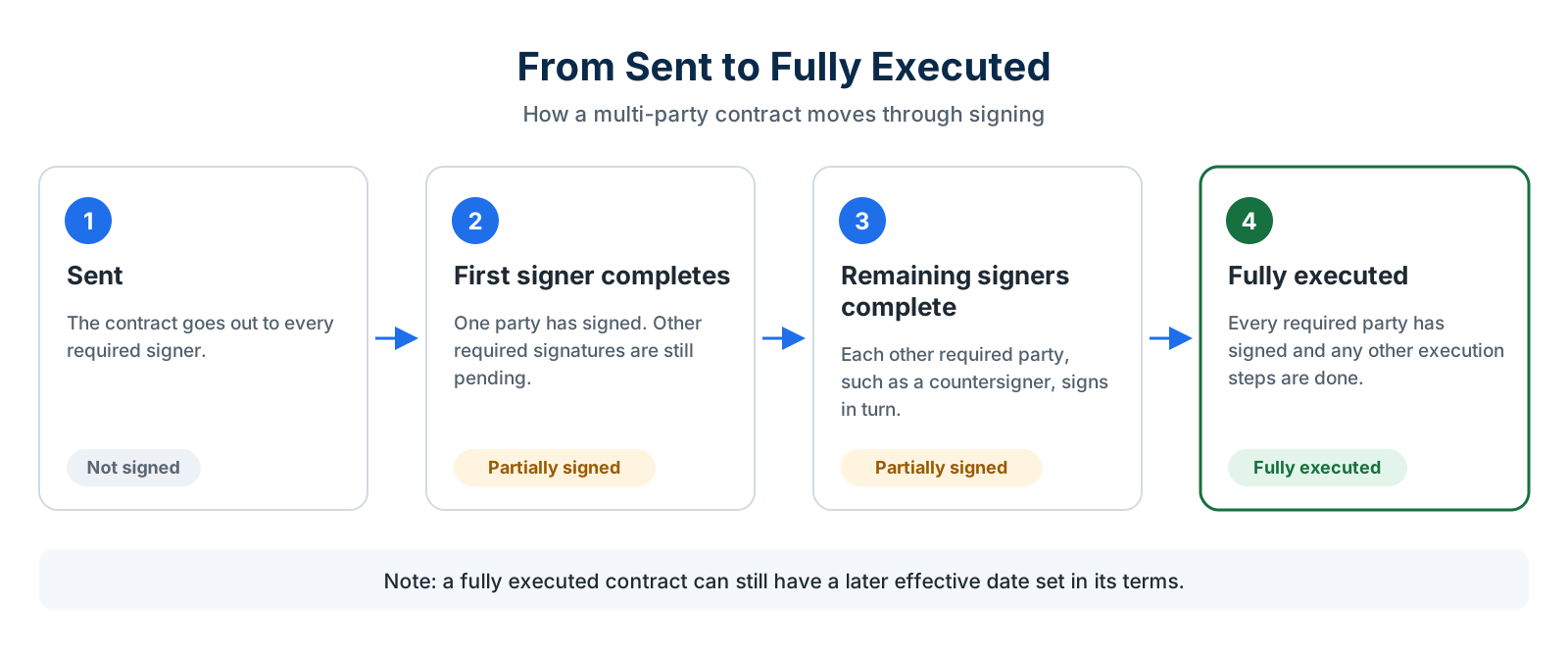
In everyday business use, an executed agreement often refers to the final signed version of a contract. Imagine a consulting agreement that requires signatures from both the company and the consultant:
- The company prepares and sends the agreement.
- The consultant signs it.
- The company countersigns it.
- The required signing process is complete.
At that point, the parties may describe the agreement as fully executed.
The important qualification is that signing is not the only factor that can matter. Some documents may require delivery, witnessing, notarization, approval, or another formality. The contract itself may also state when it becomes effective.
That is why “executed” should be read in the context of the actual agreement rather than treated as a universal synonym for “someone signed it.”
Executed vs. Fully Executed vs. Signed Contract
These terms overlap, but they do not always mean exactly the same thing.
| Term | What It Usually Means | Key Question |
|---|---|---|
| Signed contract | One or more required parties have placed their signatures on the agreement | Who has signed? |
| Executed contract | The signing or other required formalities for execution have been completed | Have the required execution steps been completed? |
| Fully executed contract | Common business term for an agreement that has been signed by all required signatories and completed the applicable execution steps | Has everyone who must execute the agreement done so? |
| Effective contract | The agreement's rights and obligations have taken effect under its terms | When does the agreement begin to operate? |
A document can therefore be signed but not yet fully executed.
For example, if a sales contract requires the customer and an authorized company representative to sign, the agreement is only partially signed after the customer completes it. It becomes fully executed once the company's required signatory also signs, assuming no other execution formalities remain.
Likewise, a fully executed document may state that its obligations begin on a later effective date.
When Is a Contract Considered Executed?
There is no single rule that applies to every contract.
A contract is an agreement creating legally enforceable obligations when the applicable requirements for contract formation are satisfied. Those requirements can vary, and U.S. contract law is largely governed by state law.
For a written business agreement specifically designed to be executed through signatures, however, the practical question is usually whether all required signatories and any other required execution steps have been completed.
All Required Parties Have Signed
If an agreement requires signatures from two parties, one signature alone does not normally make the document “fully executed” in the way businesses commonly use that term.
Consider an agreement with this sequence:
Customer → Company representative
After the customer signs, the contract is partially signed. After the company representative countersigns, the required signature sequence is complete.
The parties can then retain the completed version as the fully executed agreement, assuming the contract does not require another step.
For multi-party agreements, a defined signing sequence can help make clear when each signatory should act. Blueink lets teams control the order in which required signers receive an agreement.
Signing in Counterparts
Contracts do not always need every person to sign the exact same physical sheet.
Many agreements contain a counterparts clause, allowing different parties to sign separate copies or counterparts of the same agreement. Those signature pages can then be treated together as part of the completed agreement, subject to the contract terms and applicable law.
This is especially practical when signatories are in different locations. Electronic signing makes the process simpler because the document can move between required signers electronically without physically mailing separate copies.
The exact effect of a counterparts’ provision depends on the agreement and applicable law, so organizations should not assume a standard counterparts clause works identically for every type of document.
Effective Date vs. Execution Date
The execution date and effective date can be the same date, but they do not have to be. The execution date generally relates to when the agreement completes the required execution process.
The effective date is the date the parties specify for the agreement's rights and obligations to begin. For example:
- Company signs: October 19
- Customer signs: October 21
- Agreement becomes fully executed: October 21
- Contract states an effective date of November 1
In this example, the contract may be fully executed on October 21 while its stated effective date is November 1.
A contract can also contain wording such as:
“This Agreement is effective as of [date].”
That date should be distinguished from the dates beside individual signatures.
The same distinction can matter in recurring commercial agreements. A master service agreement (MSA) might be signed at the end of one month but states that the business relationship begins on another date.
If the dates do not match, read the agreement carefully rather than assuming the last signature date automatically controls every contractual obligation.
Executed Contract vs. Executory Contract
An executory contract is a different legal concept and should not be confused with a contract that is simply waiting for signatures.
In legal terminology, executory generally describes a contract under which obligations still remain to be performed. Cornell's Legal Information Institute contrasts that use with an “executed” contract in the performance sense, where the parties have fulfilled their obligations.
This creates an important language distinction.
A contract can be fully executed in the signing sense but still executory in the performance sense. For example, a one-year services agreement may already contain every required signature, yet both sides still have months of obligations left to perform.
For this article, “executed contract” refers primarily to the common transactional use involving completed contract formalities and signatures.
Can a Contract Be Executed Electronically?
Yes, many U.S. business contracts can be executed electronically.
Under the federal ESIGN Act's general rule of validity, a signature, contract, or other record relating to a transaction in or affecting interstate or foreign commerce generally cannot be denied legal effect, validity, or enforceability solely because it is electronic. The Act likewise states that a contract cannot be denied legal effect solely because an electronic signature or electronic record was used in forming it.
That rule does not erase every other legal requirement. The Act preserves other requirements relating to parties' rights and obligations, and some documents or transactions may be subject to separate rules or exclusions.
Blueink's guide to the ESIGN Act and electronic signatures provides additional background for businesses using electronic agreements.
For ordinary contract workflows, electronic execution can remove the physical handoffs associated with printing, mailing, signing, scanning, and returning the final agreement.
How to Execute a Contract Online With Blueink
Once a contract has been reviewed, approved, and is ready for signature, Blueink can manage the electronic signing process.
1. Upload the Contract or Start From a Reusable Template
Upload the approved contract or use a reusable template for an agreement your business sends regularly. Reusable templates are helpful for contracts where the core language and signing structure remain consistent but names, dates, pricing, or other transaction details change.
Blueink supports recurring and one-off agreements.
2. Add Every Required Signatory
Add the people who need to sign the contract and assign the appropriate fields to each person.
Before sending, confirm that everyone who needs to execute the agreement is included. Missing a required signatory can leave you with a partially signed document rather than the fully executed copy you expected.
3. Set the Signing Order When Sequence Matters
Some agreements can only move to the next signatory after the first person signs.
For example:
Customer → Sales representative
or:
Vendor → Procurement representative → Executive
Blueink supports sequential signing so the next designated signer receives the document after the previous required signer completes their part. This can be useful for countersignatures and other agreements where one signature should trigger the next.
4. Send the Agreement and Use Reminders
Once the contract is ready, send it to the required parties.
If someone has not completed their part, Blueink supports customizable reminder emails for outstanding signatures. This helps keep the agreement moving without requiring someone to manually check every pending contract and send separate follow-up messages.
5. Track Who Has Signed
Blueink's Real-Time Dashboard shows document and signer status while an agreement is in progress. That makes it easier to distinguish between:
- an agreement that has only been sent;
- one that has been signed by some parties;
- one still waiting for a countersignature; and
- a completed agreement.
The dashboard also provides access to event information and completed PDFs once the signing process finishes.
6. Keep the Completed Copy and Certificate of Evidence
After the envelope is completed, Blueink creates a Certificate of Evidence with an event log covering the signing process, including information about signers, authentication, documents, signatures, and attachments.
Blueink can also notify signers when completed documents are ready. Accounts can enable signed-document attachments in the completion email so recipients can receive the signed documents directly with the notification.
Keeping the fully executed agreement together with its signing record makes it easier to distinguish the final completed contract from earlier drafts or partially signed versions.
If your organization is deciding whether an eSignature workflow is enough or whether it also needs broader contract-management capabilities, see CLM software vs. eSignature. For the larger context around how agreements are managed before and after signing, Blueink's guide to contract lifecycle management covers that separate topic.
Why the Difference Between Signed and Fully Executed Matters
Knowing whether a contract is merely signed by one party or fully executed can affect everyday business administration. Teams may need to know:
- Whether another signature is still outstanding
- Which version should be stored as the final agreement
- Whether a countersigner still needs to act
- Which date should be recorded as the execution date
- Whether the effective date has arrived
- Whether a completed copy has been distributed
- Whether the signing record is available for future reference
The safest operational approach is to avoid treating every document containing a signature as the final version.
Track all required signatories, confirm that the execution requirements in the agreement have been completed, and keep the completed copy separately from earlier drafts. For a step-by-step guide focused specifically on the mechanics of electronic contract signing, see how to sign a contract electronically with Blueink.
From Signed to Fully Executed Without the Paper Handoffs
A signed contract and a fully executed contract are not always the same thing.
A document may contain one signature while still waiting for another required party. A contract may be fully executed but not become effective until a later date. And in legal discussions of an executory contract, “executed” may refer to completed performance rather than the signing process.
The contract itself is the starting point. Check who must sign, whether any additional formalities apply, and when the agreement says it becomes effective.
Want to see what that looks like first? Try a sample contract signing demo to walk through the signer experience.
Ready to execute a contract online with your own documents? Start your free Blueink trial.
Frequently Asked Questions
What Is an Executed Contract?
An executed contract generally refers to a contract that has completed the signing or other formal requirements needed for execution.
For a typical multi-party written agreement, businesses commonly use the term fully executed when all required signatories have signed and any other required execution steps have been completed.
What Does Fully Executed Mean?
“Fully executed” usually means that every party required to sign an agreement has done so and the required execution formalities are complete.
It does not necessarily mean every obligation in the contract has already been performed or that the agreement became effective on the same date as the final signature.
Is a Signed Contract the Same as an Executed Contract?
Not always.
A contract can be signed by one party while still waiting for other required signatures. In that situation, it may be more accurate to describe the document as partially signed rather than fully executed.
Whether a signature alone completes execution also depends on the agreement and any other formal requirements that apply.
What Is the Difference Between the Effective Date and the Execution Date?
The execution date relates to when the agreement completes its required execution process. The effective date is when the contract states that its rights and obligations begin.
They can be the same date, but an agreement can also be signed and fully executed before its stated effective date.
Can a Contract Be Executed Electronically?
Yes, many U.S. contracts can be executed electronically.
For transactions covered by the federal ESIGN Act, a contract or signature generally cannot be denied legal effect solely because it is in electronic form. Other legal, contractual, or document-specific requirements may still apply.
Disclaimer
Blueink is not a law firm and does not provide legal advice. This page is for informational purposes only and should not be considered a substitute for professional legal counsel. If you have questions about the validity or enforceability of eSignatures or digital signatures, we recommend consulting with a licensed attorney. Use of Blueink’s services is subject to our Terms of Use and Privacy Policy.

Weekly Newsletter
Get the latest updates, tips, and exclusive offers. Sign up for our weekly newsletter and stay informed!
Recent post
October 16, 2026
October 12, 2026
October 6, 2026
An executed contract is generally a contract that has completed the signing or other formal steps required for execution. In a typical written agreement with multiple required signatories, a fully executed contract usually means every required party has signed and the required execution formalities have been completed.
That does not always mean the contract has already taken effect or that every obligation under it has been performed. Those are separate questions, which is why terms such as signed, executed, effective, and executory can create confusion.
What Does "Executed" Mean in a Contract?
In legal usage, to execute a document can mean signing it or completing the formal requirements needed to make it effective. Execution may involve a signature, delivery, or other required formalities depending on the document and applicable law.
In everyday business use, an executed agreement often refers to the final signed version of a contract. Imagine a consulting agreement that requires signatures from both the company and the consultant:
- The company prepares and sends the agreement.
- The consultant signs it.
- The company countersigns it.
- The required signing process is complete.
At that point, the parties may describe the agreement as fully executed.
The important qualification is that signing is not the only factor that can matter. Some documents may require delivery, witnessing, notarization, approval, or another formality. The contract itself may also state when it becomes effective.
That is why “executed” should be read in the context of the actual agreement rather than treated as a universal synonym for “someone signed it.”
Executed vs. Fully Executed vs. Signed Contract
These terms overlap, but they do not always mean exactly the same thing.
| Term | What It Usually Means | Key Question |
|---|---|---|
| Signed contract | One or more required parties have placed their signatures on the agreement | Who has signed? |
| Executed contract | The signing or other required formalities for execution have been completed | Have the required execution steps been completed? |
| Fully executed contract | Common business term for an agreement that has been signed by all required signatories and completed the applicable execution steps | Has everyone who must execute the agreement done so? |
| Effective contract | The agreement's rights and obligations have taken effect under its terms | When does the agreement begin to operate? |
A document can therefore be signed but not yet fully executed.
For example, if a sales contract requires the customer and an authorized company representative to sign, the agreement is only partially signed after the customer completes it. It becomes fully executed once the company's required signatory also signs, assuming no other execution formalities remain.
Likewise, a fully executed document may state that its obligations begin on a later effective date.

When Is a Contract Considered Executed?
There is no single rule that applies to every contract.
A contract is an agreement creating legally enforceable obligations when the applicable requirements for contract formation are satisfied. Those requirements can vary, and U.S. contract law is largely governed by state law.
For a written business agreement specifically designed to be executed through signatures, however, the practical question is usually whether all required signatories and any other required execution steps have been completed.
All Required Parties Have Signed
If an agreement requires signatures from two parties, one signature alone does not normally make the document “fully executed” in the way businesses commonly use that term.
Consider an agreement with this sequence:
Customer → Company representative
After the customer signs, the contract is partially signed. After the company representative countersigns, the required signature sequence is complete.
The parties can then retain the completed version as the fully executed agreement, assuming the contract does not require another step.
For multi-party agreements, a defined signing sequence can help make clear when each signatory should act. Blueink lets teams control the order in which required signers receive an agreement.
Signing in Counterparts
Contracts do not always need every person to sign the exact same physical sheet.
Many agreements contain a counterparts clause, allowing different parties to sign separate copies or counterparts of the same agreement. Those signature pages can then be treated together as part of the completed agreement, subject to the contract terms and applicable law.
This is especially practical when signatories are in different locations. Electronic signing makes the process simpler because the document can move between required signers electronically without physically mailing separate copies.
The exact effect of a counterparts’ provision depends on the agreement and applicable law, so organizations should not assume a standard counterparts clause works identically for every type of document.
Effective Date vs. Execution Date
The execution date and effective date can be the same date, but they do not have to be. The execution date generally relates to when the agreement completes the required execution process.
The effective date is the date the parties specify for the agreement's rights and obligations to begin. For example:
- Company signs: October 19
- Customer signs: October 21
- Agreement becomes fully executed: October 21
- Contract states an effective date of November 1
In this example, the contract may be fully executed on October 21 while its stated effective date is November 1.
A contract can also contain wording such as:
“This Agreement is effective as of [date].”
That date should be distinguished from the dates beside individual signatures.
The same distinction can matter in recurring commercial agreements. A master service agreement (MSA) might be signed at the end of one month but states that the business relationship begins on another date.
If the dates do not match, read the agreement carefully rather than assuming the last signature date automatically controls every contractual obligation.
Executed Contract vs. Executory Contract
An executory contract is a different legal concept and should not be confused with a contract that is simply waiting for signatures.
In legal terminology, executory generally describes a contract under which obligations still remain to be performed. Cornell's Legal Information Institute contrasts that use with an “executed” contract in the performance sense, where the parties have fulfilled their obligations.
This creates an important language distinction.
A contract can be fully executed in the signing sense but still executory in the performance sense. For example, a one-year services agreement may already contain every required signature, yet both sides still have months of obligations left to perform.
For this article, “executed contract” refers primarily to the common transactional use involving completed contract formalities and signatures.
Can a Contract Be Executed Electronically?
Yes, many U.S. business contracts can be executed electronically.
Under the federal ESIGN Act's general rule of validity, a signature, contract, or other record relating to a transaction in or affecting interstate or foreign commerce generally cannot be denied legal effect, validity, or enforceability solely because it is electronic. The Act likewise states that a contract cannot be denied legal effect solely because an electronic signature or electronic record was used in forming it.
That rule does not erase every other legal requirement. The Act preserves other requirements relating to parties' rights and obligations, and some documents or transactions may be subject to separate rules or exclusions.
Blueink's guide to the ESIGN Act and electronic signatures provides additional background for businesses using electronic agreements.
For ordinary contract workflows, electronic execution can remove the physical handoffs associated with printing, mailing, signing, scanning, and returning the final agreement.
How to Execute a Contract Online With Blueink
Once a contract has been reviewed, approved, and is ready for signature, Blueink can manage the electronic signing process.
1. Upload the Contract or Start From a Reusable Template
Upload the approved contract or use a reusable template for an agreement your business sends regularly. Reusable templates are helpful for contracts where the core language and signing structure remain consistent but names, dates, pricing, or other transaction details change.
Blueink supports recurring and one-off agreements.
2. Add Every Required Signatory
Add the people who need to sign the contract and assign the appropriate fields to each person.
Before sending, confirm that everyone who needs to execute the agreement is included. Missing a required signatory can leave you with a partially signed document rather than the fully executed copy you expected.
3. Set the Signing Order When Sequence Matters
Some agreements can only move to the next signatory after the first person signs.
For example:
Customer → Sales representative
or:
Vendor → Procurement representative → Executive
Blueink supports sequential signing so the next designated signer receives the document after the previous required signer completes their part. This can be useful for countersignatures and other agreements where one signature should trigger the next.
4. Send the Agreement and Use Reminders
Once the contract is ready, send it to the required parties.
If someone has not completed their part, Blueink supports customizable reminder emails for outstanding signatures. This helps keep the agreement moving without requiring someone to manually check every pending contract and send separate follow-up messages.
5. Track Who Has Signed
Blueink's Real-Time Dashboard shows document and signer status while an agreement is in progress. That makes it easier to distinguish between:
- an agreement that has only been sent;
- one that has been signed by some parties;
- one still waiting for a countersignature; and
- a completed agreement.
The dashboard also provides access to event information and completed PDFs once the signing process finishes.
6. Keep the Completed Copy and Certificate of Evidence
After the envelope is completed, Blueink creates a Certificate of Evidence with an event log covering the signing process, including information about signers, authentication, documents, signatures, and attachments.
Blueink can also notify signers when completed documents are ready. Accounts can enable signed-document attachments in the completion email so recipients can receive the signed documents directly with the notification.
Keeping the fully executed agreement together with its signing record makes it easier to distinguish the final completed contract from earlier drafts or partially signed versions.
If your organization is deciding whether an eSignature workflow is enough or whether it also needs broader contract-management capabilities, see CLM software vs. eSignature. For the larger context around how agreements are managed before and after signing, Blueink's guide to contract lifecycle management covers that separate topic.
Why the Difference Between Signed and Fully Executed Matters
Knowing whether a contract is merely signed by one party or fully executed can affect everyday business administration. Teams may need to know:
- Whether another signature is still outstanding
- Which version should be stored as the final agreement
- Whether a countersigner still needs to act
- Which date should be recorded as the execution date
- Whether the effective date has arrived
- Whether a completed copy has been distributed
- Whether the signing record is available for future reference
The safest operational approach is to avoid treating every document containing a signature as the final version.
Track all required signatories, confirm that the execution requirements in the agreement have been completed, and keep the completed copy separately from earlier drafts. For a step-by-step guide focused specifically on the mechanics of electronic contract signing, see how to sign a contract electronically with Blueink.
From Signed to Fully Executed Without the Paper Handoffs
A signed contract and a fully executed contract are not always the same thing.
A document may contain one signature while still waiting for another required party. A contract may be fully executed but not become effective until a later date. And in legal discussions of an executory contract, “executed” may refer to completed performance rather than the signing process.
The contract itself is the starting point. Check who must sign, whether any additional formalities apply, and when the agreement says it becomes effective.
Want to see what that looks like first? Try a sample contract signing demo to walk through the signer experience.
Ready to execute a contract online with your own documents? Start your free Blueink trial.
Frequently Asked Questions
What Is an Executed Contract?
An executed contract generally refers to a contract that has completed the signing or other formal requirements needed for execution.
For a typical multi-party written agreement, businesses commonly use the term fully executed when all required signatories have signed and any other required execution steps have been completed.
What Does Fully Executed Mean?
“Fully executed” usually means that every party required to sign an agreement has done so and the required execution formalities are complete.
It does not necessarily mean every obligation in the contract has already been performed or that the agreement became effective on the same date as the final signature.
Is a Signed Contract the Same as an Executed Contract?
Not always.
A contract can be signed by one party while still waiting for other required signatures. In that situation, it may be more accurate to describe the document as partially signed rather than fully executed.
Whether a signature alone completes execution also depends on the agreement and any other formal requirements that apply.
What Is the Difference Between the Effective Date and the Execution Date?
The execution date relates to when the agreement completes its required execution process. The effective date is when the contract states that its rights and obligations begin.
They can be the same date, but an agreement can also be signed and fully executed before its stated effective date.
Can a Contract Be Executed Electronically?
Yes, many U.S. contracts can be executed electronically.
For transactions covered by the federal ESIGN Act, a contract or signature generally cannot be denied legal effect solely because it is in electronic form. Other legal, contractual, or document-specific requirements may still apply.