

Blueink vs. Jotform Sign: Which eSignature Tool Fits Your Team?

If you're comparing Blueink and Jotform Sign, this Jotform eSignature comparison comes down to what you need beyond a signature.
Blueink is more focused on signing itself. That makes it a better fit for teams that need structured document workflows, multi-user access, signer checks, a dedicated signing API, and high-volume sending. Jotform Sign fits teams that want signing inside a broader forms, data collection, and no-code automation stack.
Both products can create signable documents, use reusable templates, automate reminders, track signer activity, generate audit records, and send documents in bulk. The bigger difference is the workflow around the signature and how each platform fits into the rest of your system.
Blueink puts more of its product around signing itself, including reusable document and envelope templates, signer checks, real-time tracking, Bulk Send, Smart Link Forms, and a developer-focused signing API. Jotform Sign sits inside Jotform's larger form-building ecosystem, with a drag-and-drop builder, 1,000+ Sign templates, Jotform Tables, approval flows, reports, integrations, and native Bulk Send.
That difference matters if your team has moved past simple signature capture and needs a document flow that can scale across departments, users, or high-volume sending.
Blueink vs. Jotform Sign at a Glance
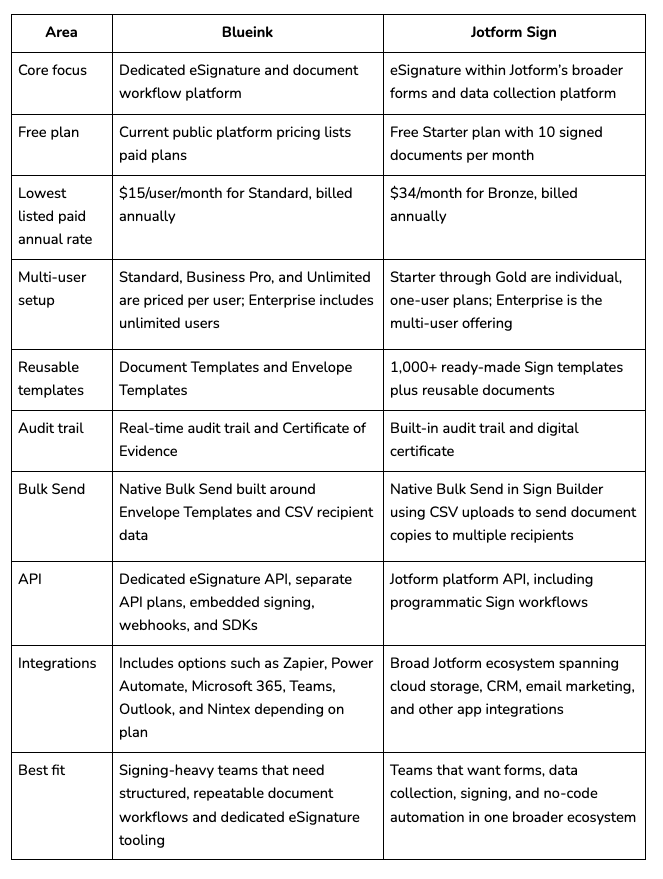
Blueink vs Jotform Sign pricing is not just a question of which number is lower, because the two products package usage in different ways.
Blueink prices its standard platform plans per user, with envelope and template limits that rise by tier. Jotform's non-Enterprise plans are one-user accounts and bundle Jotform Sign with the wider Jotform platform, including form, submission, storage, payment submission, and signed-document limits.
Blueink vs. Jotform Sign Pricing
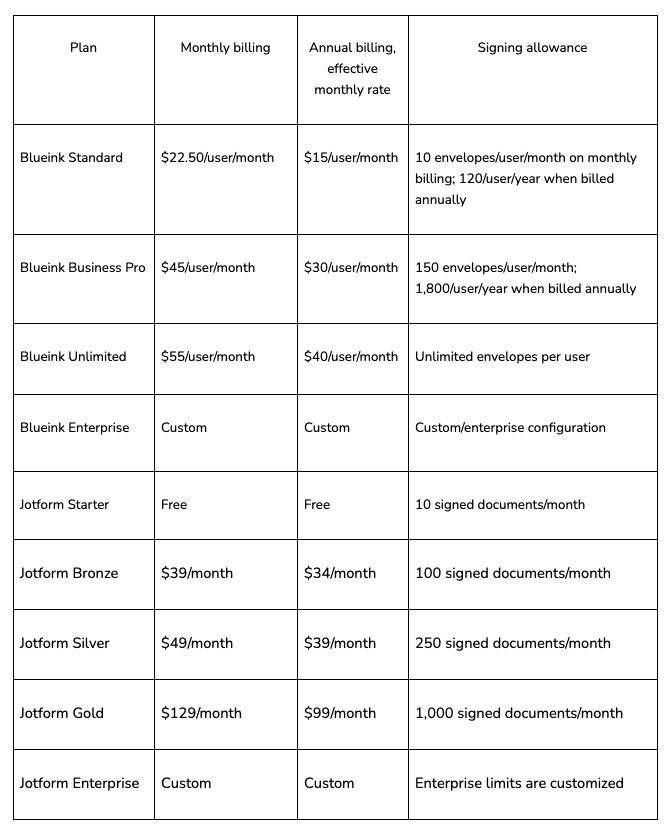
Is Blueink cheaper than Jotform Sign?
Blueink has the lower listed paid entry price, but Jotform offers a free tier that Blueink's current public platform pricing does not.
For annual billing, Blueink Standard is listed at $15 per user per month versus $34 per month for Jotform Bronze. Blueink Business Pro is $30 per user per month annually versus $39 for Jotform Silver, while Blueink Unlimited is $40 per user per month annually versus $99 for Jotform Gold.
But price alone does not tell the whole story. Jotform Bronze allows 100 signed documents per month, compared with 10 envelopes per month on Blueink Standard. Jotform Silver allows 250 signed documents per month, compared with 150 monthly envelopes on Blueink Business Pro. Blueink Unlimited, on the other hand, removes the per-user envelope limit.
Jotform also includes its broader form-building ecosystem in those plans. If you need both forms and signing, that extra functionality may matter more than the headline price.
For the latest Blueink rates and plan details, see Blueink pricing.
Blueink vs. Jotform Sign Features
If you're comparing Jotform Sign vs. Blueink features, the main split shows up in templates, workflow, and how each tool handles signing records.
Templates
Blueink takes a workflow-first approach. Teams can create reusable Document Templates with signer roles and preset fields, as well as Envelope Templates for recurring multi-document workflows.
Jotform has an edge if you want a large library of prebuilt starting points. Its current Sign feature page advertises 1,000+ ready-made templates, along with a no-code drag-and-drop document builder.
If your priority is finding an existing template and changing it visually, Jotform Sign has the stronger library. If your organization already has approved contracts and forms and wants to turn them into repeatable signing workflows, Blueink's template model is built for that use case.
Audit trails
Both products provide signing records.
Blueink provides a real-time audit trail and a separate Certificate of Evidence that records activity tied to the signing process.
Jotform Sign generates an audit trail with an ordered record of signer actions and also offers digital certificates.
Both platforms support audit checks. Buyers should compare the level of evidence, signer checks, and recordkeeping their specific workflows need.
Bulk sending
Both Blueink and Jotform Sign now support native bulk sending. The difference is no longer whether the feature exists, but how it fits into each platform's workflow.
Blueink's Bulk Send workflow starts with an Envelope Template. Teams select the template, upload a CSV with signer information, and send personalized envelopes to multiple recipients. If an Envelope Template contains pre-existing data fields, Blueink also documents an option to upload signer information together with envelope data fields.
Jotform Sign now also includes native Bulk Send directly within Sign Builder. Users can upload a CSV and send independent copies of a Sign document to multiple recipients at once.
Buyers should think about how bulk sending fits into the rest of the workflow. Blueink's setup sits inside a signing-focused system built around Envelope Templates, signer roles, tracking, checks, and document evidence. Jotform's setup sits inside a broader platform that also includes forms, data capture, Tables, reports, and no-code automation.
For organizations sending large batches of standard signing packets, both products should be judged by expected document volume, recipient structure, template needs, user count, and the wider workflow around each bulk send.
Workflows: Form-First vs. Signing-First
The biggest difference between these products becomes clearer when you look at the workflow around the signature.
Blueink
Blueink starts from the document transaction.
Its feature set centers on preparing documents, defining signer roles, sending envelopes, checking signers, tracking completion, reusing document and envelope templates, sending at scale, and linking signing into other systems.
Its Real-Time Dashboard provides signer information, event logs, live document views, status tracking, and completed PDFs. Its feature overview also includes email, SMS, and Smart Link delivery, reusable templates, audit trails, and embedded signing.
For teams where signing is the core workflow rather than one piece of a form platform, that narrow focus can be an advantage.
Jotform Sign
Jotform Sign benefits from being part of the wider Jotform platform. Users can combine signing with Jotform's form tools, Tables, dashboards, approval flows, reports, public links, website embedding, and integrations.
Jotform Sign itself supports automatic field detection, signer delegation, signing order, reminders, notification emails, embedded Sign forms, and rich document fields.
This makes it especially useful when the process begins with collecting structured information rather than simply sending an existing business document for signature.
For example, Jotform may be the more natural fit if your workflow starts with an application, registration form, survey, intake questionnaire, or payment form and then feeds that information into a signing or approval process.
API and Developer Workflows
oth companies let you connect with code, but Blueink gives signing API use cases more direct product treatment.
Blueink offers a dedicated signing API product with separate API plans and documentation. Blueink publicly documents REST endpoints for creating, sending, monitoring, searching, and exporting signing data, along with webhooks, embedded signing, document templates, and SDKs for Python, JavaScript, and PHP.
Jotform maintains a broader platform API, and its official support content shows how to create a Jotform Sign document through the Jotform API.
That difference matters if signing is going into your own software, website, CRM, portal, or internal platform rather than simply being used through a no-code interface.
If API flexibility is one of your main buying criteria, it is worth reviewing Blueink's API separately from the standard platform plans.
Integrations
Both Jotform Sign and Blueink support broad integration ecosystems, but they start from different places.
Blueink also offers extensive integrations. Its no-code connections link with more than 1,000 applications, including cloud storage, CRM, and communication tools. Blueink also supports Zapier, Power Automate, Microsoft 365, Teams, Outlook, and Nintex, while Blueink's API supports deeper custom integrations and embedded signing.
Jotform Sign connects with CRM systems, cloud storage services, email marketing platforms, and other apps, while also working closely with Jotform Tables, reports, workflows, and the wider Jotform product suite.
If your organization already relies heavily on Jotform for forms, data capture, and related workflows, keeping signing in that ecosystem may simplify your stack. If signing is the core workflow and you want to connect it to a wide range of existing business apps or build custom integrations through a dedicated API, Blueink may be the stronger fit.
Ease of Use
There is no universal answer to which platform is easier. They are built for different jobs.
Blueink is more focused on conventional document-signing workflows. Teams can upload an existing PDF, set up reusable templates with signer roles and fields, send envelopes, and monitor them from the dashboard.
Jotform Sign uses the same no-code approach as the broader Jotform platform. Its drag-and-drop builder, 1,000+ ready-made templates, and rich field types can make it especially friendly for teams that want to design forms and signable documents without code.
So the better question is not which interface is easier. It is which interface matches the work your team actually does.
Choose Blueink If...
Blueink is likely the better fit if signing is a core workflow rather than an add-on to a form builder. It is also a strong Jotform Sign alternative.
Choose Blueink if your organization:
- Sends existing contracts, agreements, and standard documents again and again.
- Needs multiple paid users without moving straight to an enterprise-only multi-user product.
- Wants reusable Document and Envelope Templates built for signing workflows.
- Needs a dedicated signing API with embedded signing, webhooks, and public developer tools.
- Wants an unlimited-envelope option on a published per-user plan.
- Values signing-focused features such as SMS delivery, signer checks, real-time tracking, and Certificates of Evidence.
- Needs Bulk Send as part of an Envelope Template-based workflow rather than a broader forms platform.
Blueink is also SOC 2 Type II compliant according to its current compliance materials.
If you are also evaluating a larger incumbent, you can compare Blueink to DocuSign.
Choose Jotform Sign If...
Jotform Sign is likely the better fit if forms and data capture matter as much as the signature itself.
Choose Jotform Sign if your organization:
- Already uses Jotform and wants signing in the same ecosystem.
- Needs a free starting option for low signing volume.
- Wants a large library of ready-made Sign templates.
- Builds complex forms with rich field types and validation.
- Wants form submissions, signature data, Tables, and reporting in one platform.
- Uses approval flows alongside signing.
- Wants public signing links or embedded Sign forms for self-service workflows.
- Needs CSV-based Bulk Send directly from Sign Builder.
- Wants a broader no-code form-builder-plus-signing environment.
For a team whose core workflow is forms, intake, structured data capture, and signing, that wider platform can be an advantage.
Limitations to Consider Before Choosing
Blueink limitations
Blueink is not meant to replace a full general-purpose form platform like Jotform. Smart Link Forms do support self-service signing workflows, but organizations looking for a large no-code form ecosystem, thousands of form templates, surveys, app building, and deep form-data reporting may find Jotform broader.
Jotform Sign limitations
Jotform Starter, Bronze, Silver, and Gold are currently individual one-user plans. Organizations that need Jotform's native multi-user environment must look to Jotform Enterprise, which uses custom pricing. Jotform's current pricing page explicitly identifies Enterprise as its multi-user platform.
Its non-Enterprise plans also keep defined limits for forms, submissions, storage, and monthly signed documents. Starter includes 10 signed documents per month, Bronze 100, Silver 250, and Gold 1,000, while Enterprise lists unlimited signed documents.
Switching From Jotform Sign to Blueink
You can move signing workflows from Jotform Sign to Blueink, but you should not expect a one-click migration of Jotform's full form ecosystem.
Start by separating your documents from your forms.
If you use Jotform mainly to upload contracts or PDFs and collect signatures, those source files can be uploaded into Blueink and rebuilt as reusable Document or Envelope Templates. Blueink templates support signer roles and preset fields, so they work well for recurring agreements.
If your Jotform workflow depends heavily on dynamic forms, conditional logic, Tables, reports, apps, or other Jotform-specific features, first identify which parts actually need to move. Blueink is a signing platform, not a drop-in replacement for every Jotform product.
A practical migration looks like this:
- Inventory the Jotform Sign documents your team actually uses.
- Export or keep the approved source documents and completed records you need.
- Map signer roles, signing order, fields, reminders, and delivery rules.
- Rebuild repeatable documents as Blueink Document or Envelope Templates.
- Decide whether high-volume workflows should use Bulk Send or Smart Link Forms.
- Test each workflow before retiring the old process.
- Confirm that historical documents remain accessible under your company's record-retention rules.
For larger deployments, Blueink Enterprise currently includes a Customer Success Team, which is worth discussing when planning a broader rollout.
Blueink or Jotform Sign: Which Should You Choose?
Jotform Sign and Blueink overlap on the basics of electronic signing, but they solve the surrounding workflow differently.
Choose Jotform Sign when forms, intake, structured data capture, and no-code automation are central to the process. Its large template library and wider Jotform ecosystem are meaningful advantages for those use cases.
Choose Blueink when signing itself is the operational priority. Its per-user plans, Document and Envelope Templates, signer checks, real-time document tracking, dedicated signing API, Certificate of Evidence, and unlimited-envelope option make it especially relevant for organizations building repeatable signing workflows across teams.
The right choice depends less on which platform has the longest feature list and more on what happens before, during, and after the signature.
Want to see how Blueink would fit your document workflows? Schedule a demo with Blueink.
FAQs
Which is better for small teams, Blueink or Jotform Sign?
It depends on how the team works. Jotform can be a strong choice for one primary user who needs forms, data capture, and signing together. Its Starter through Gold plans are individual one-user plans. Blueink's platform pricing is per user, which makes it more directly suited to small teams that need several people working in a signing-focused system without moving right away to an Enterprise product.
Does Jotform Sign have an API comparable to Blueink's?
Jotform has a broader platform API, and its own support docs show Sign documents being created through that API. Blueink offers a dedicated signing API product with separate pricing and published capabilities that include envelope creation, sending, monitoring, search, export, webhooks, embedded signing, and SDKs. Both can support programmatic workflows, but Blueink packages its API specifically around signing.
Can I move my forms and signing workflow from Jotform Sign to Blueink?
It depends on what's driving the switch. Blueink is a strong Jotform Sign alternative if your team has outgrown Jotform Sign's single-user Bronze, Silver, and Gold plans and needs several people working in a signing-focused system with per-user pricing, or if you specifically want a dedicated signing API instead of a broader forms platform API.
It is a weaker fit if forms, data capture, Tables, or no-code app building are central to your workflow, since Blueink is not a general-purpose form builder. Judge the tools by what surrounds the signature, not only by the signature itself.
Does Blueink's Bulk Send work the same way as Jotform Sign's?
Both support native bulk sending, but access differs. Blueink's Bulk Send is available on Enterprise plans and is built around Envelope Templates and CSV recipient data. Jotform Sign's Bulk Send is built into Sign Builder using CSV uploads. Confirm current plan-tier requirements for both before comparing costs, since Blueink's version currently requires Enterprise custom pricing rather than being included at the Standard, Business Pro, or Unlimited level.
Disclaimer
Blueink is not a law firm and does not provide legal advice. This page is for informational purposes only and should not be considered a substitute for professional legal counsel. If you have questions about the validity or enforceability of eSignatures or digital signatures, we recommend consulting with a licensed attorney. Use of Blueink’s services is subject to our Terms of Use and Privacy Policy.

Recent post
October 16, 2026
October 12, 2026
October 6, 2026