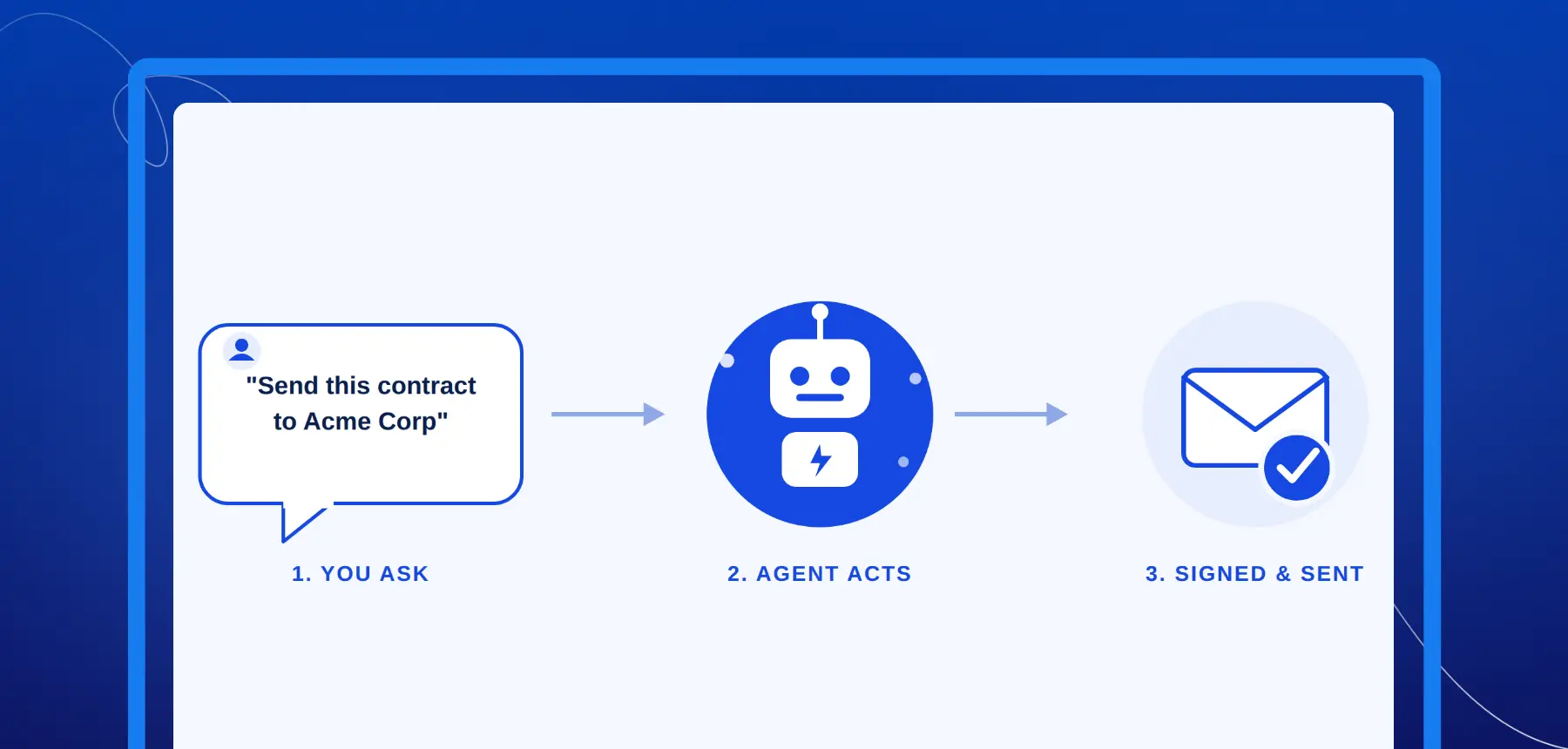

Blueink's MCP Server: How AI Agents Can Now Send and Track E-Signatures

Somewhere between “email me the contract” and “the deal is signed,” there is usually a lot of manual busywork.
Someone has to find the right template. Fill in the recipient. Send the envelope. Check whether anyone has opened it. Follow up when it stalls. Download the signed PDF once it is complete. Then update the CRM, shared folder, dashboard, or internal tracker.
Blueink just closed that gap. With the Blueink MCP server, an AI agent, whether that is Claude Code, Cursor, Windsurf, VS Code with GitHub Copilot, or another MCP-compatible client, can now interact with Blueink through plain natural language. That means an agent can help create, send, search, and track e-signature envelopes without your team building a custom integration for every workflow.
If you are already using the Blueink eSignature API, you can connect an AI agent using the same Blueink API key. If you are new to the idea of AI agents handling document signing, here is what you need to know: what MCP is, what Blueink’s server can do today, how the broader e-signature market is moving, and how to get connected.
What Is an MCP Server, in Plain Terms?
MCP stands for Model Context Protocol.
Anthropic introduced Model Context Protocol in late 2024 as an open standard for connecting AI assistants to the systems where data lives, including content repositories, business tools, and development environments.
Before MCP, every time a company wanted an AI assistant to talk to an outside tool, whether that was a CRM, database, file storage system, or e-signature platform, someone had to build a custom integration for that specific combination of tool and assistant.
MCP replaces that patchwork with a standardized connection. Once a service exposes an MCP server, compatible AI clients can connect to it without the same amount of custom glue code.
Think of it the way USB-C replaced a drawer full of proprietary chargers. Before MCP, connecting an AI model to a piece of software often meant building and maintaining a one-off bridge. With MCP, the bridge is standardized, and any client that speaks the protocol can cross it.
For Blueink specifically, that means an AI agent does not need to understand the Blueink REST API endpoints, authentication scheme, or JSON request formats in detail. It only needs to understand what the user is asking for in plain English.
The MCP server handles the translation from a request like “send this contract to Sarah” into the correct, authenticated API call.
What You Can Do With Blueink’s MCP Server Today
Blueink’s MCP server exposes a focused set of tools, not open-ended access to your entire account. That means an agent can only do what it is explicitly built and authorized to do. Today, that includes the ability to:
- Create an envelope from an existing template and send it for signature
- Search envelopes by recipient email or status
- Check signer status on a specific envelope, so you know exactly who is holding up a deal
- Pull full envelope details for status reporting or reconciliation
- List available document templates so an agent can choose the correct one
- Download signed PDFs and bundle files once signing is complete
- Check API status to confirm the connection is healthy before starting a workflow
Put together, that is enough for an agent to run a signing workflow end to end: find the right template, send it, check the status, follow up with the user, and hand back the finished document. That is the value of an e-signature MCP server. It turns repetitive document actions into workflows an AI agent can help execute through natural language.
Why This Matters Right Now
AI agents are becoming more useful when they can do real work, not just answer questions. In document workflows, that work is often structured and repetitive:
- Send the agreement.
- Check whether the signer opened it.
- Find which envelopes are still pending.
- Pull the signed PDF.
- Tell the team which contracts need follow-up.
Those tasks are easy to describe in plain language, but they still take time when someone has to click through a dashboard, search manually, or assemble a status update from scratch. That is why e-signature is a natural fit for AI agent workflows.
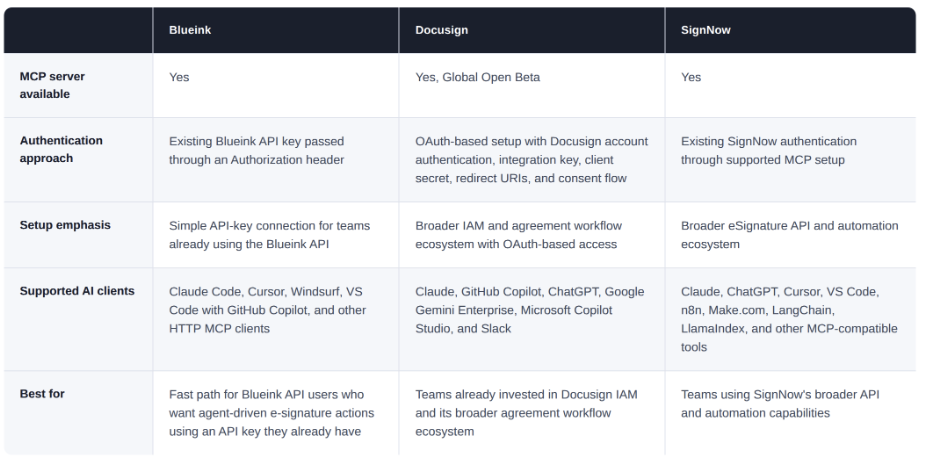
The broader market is moving in the same direction. Docusign has announced agentic agreement workflow capabilities through Docusign IAM, Iris, Agent Studio, and its MCP Server. SignNow has also released an MCP server for AI workflows.
Blueink’s clearest advantage is setup simplicity for teams already using its API. The Blueink MCP server uses the same API-key authentication model as the Blueink REST API, passed through an authorization header. That makes it straightforward for developers and AI-forward teams to connect an MCP-compatible client and start testing signing workflows without building a custom integration from scratch.
This is also consistent with how Blueink approaches its API and integrations more broadly: accessible documentation, self-serve API access, and clear pricing. Teams comparing e-signature platforms can also review Blueink’s competitor comparison, platform pricing, and API plans and pricing.
How to Connect Blueink’s MCP Server
Setup takes a few minutes, and the pattern is similar across supported clients. You will need a Blueink API key first. If you do not already have one, grab it from your account settings. Then point your AI client at Blueink’s MCP endpoint using that key as a bearer token.
Claude Code
Run this from your terminal:
claude mcp add --transport http blueink https://mcp.blueink.com/mcp \
--header "Authorization: Token your_api_key_here"
Cursor and Windsurf
Add an entry to your MCP settings JSON with the server URL and the same Authorization header, following the format each tool uses for HTTP-based MCP servers.
Use the Blueink MCP endpoint:
https://mcp.blueink.com/mcp
And pass your Blueink API key using this header pattern:
Authorization: Token your_api_key_here
VS Code with GitHub Copilot
Configure the server under the MCP servers section of your settings.json, again using the endpoint URL and Authorization header.
Any Other MCP-Compatible Client
Because Blueink’s server uses standard HTTP MCP transport, any client that supports remote MCP servers can connect using the same URL and header pattern, even if it is not explicitly listed in the documentation.
Authentication uses the exact same API key as Blueink’s standard REST API. If you have already integrated with Blueink anywhere else in your stack, there is nothing new to provision, generate, or manage separately.
For deeper technical setup, start with the Blueink MCP Server guide or the broader Blueink developer documentation.
What This Looks Like in Practice
The easiest way to understand the value is to walk through an actual exchange. Imagine a sales rep just got verbal confirmation on a deal:
“Send the standard services agreement to jsmith@acme.com and let me know as soon as it is signed.”
Behind the scenes, the agent lists Blueink’s available templates, finds the one that matches “standard services agreement,” creates an envelope from it, addresses it to the right recipient, and sends it.
No dashboard.
No manually filling in a template picker.
No separate browser tab.
A few hours later, the rep asks:
“Has jsmith signed yet?”
The agent checks signer status on that envelope and reports back. Once it is complete, a follow-up request like “pull the signed PDF” triggers a download of the finished document, ready to attach to a CRM record, store in a shared folder, or file away for internal records.
None of these are hypothetical capabilities. They map directly to the tools Blueink’s MCP server exposes today: template lookup, envelope creation, status checks, and document download, chained together through a conversation instead of a series of manual dashboard actions.
Real-World Use Cases Beyond Sales
Sales is the simplest example, but AI agents e-signature workflows can support several teams.
HR onboarding
New-hire paperwork, offer letters, policy acknowledgments, and tax forms can be sent as part of an onboarding workflow. An agent can help track which documents are still outstanding for each new employee and surface what needs attention before the start date.
Blueink’s Human Resources eSignature page covers common HR workflows such as offer letters, employee onboarding, policy acknowledgments, and other employee documents.
Procurement and government workflows
Agencies and procurement teams managing a high volume of vendor agreements can use an agent to help identify which contracts are stalled and surface only the ones that need human attention.
That is useful anywhere document turnaround time and staff bandwidth are both under pressure, which describes many public-sector and procurement-heavy workflows.
Blueink’s Government eSignature page covers public-sector signing workflows across departments such as finance, procurement, HR, courts, legal, operations, civil service, and IT.
Customer success and renewals
An agent watching for contracts nearing expiration can proactively kick off a renewal envelope or flag the account team when a renewal is out for signature. This can help prevent renewals from quietly slipping past their window.
Internal reporting
“Which contracts from last week’s batch are still waiting on a signature?” becomes a question you can ask an agent instead of a status report someone has to manually assemble from the dashboard.
The common thread is simple: when a workflow is repetitive, status-driven, and tied to a known document template, it is a strong candidate for AI agent document signing.
What to Know Before You Connect an Agent
Connecting an AI agent to any system that can send legally binding documents should be handled carefully.
The MCP server authenticates with your existing Blueink API key. That key resolves to a Blueink user and inherits that user’s full role and permissions in the account. In practice, the agent can take the same Blueink actions that the API-key owner is allowed to take.
Because of that, teams should not treat an AI agent as a low-risk shortcut just because setup is simple. The same actions that save time, such as sending an envelope, checking signer status, or downloading a signed PDF, can also expose sensitive documents or trigger real workflow consequences if used without the right controls.
Before connecting an agent, decide:
- Which Blueink user should own the API key
- Which workflows are safe for agent assistance
- Which actions should always require human review
- Whether the agent should only check status and retrieve documents at first
- When it is acceptable for the agent to create or send envelopes
- How your team will review agent activity and handle mistakes
This is especially important for customer-facing contracts, HR documents, government workflows, regulated records, payment-related agreements, and high-value transactions.
A practical rollout should start with lower-risk use cases, such as internal test envelopes, status checks, template lookup, or signed document retrieval. Once the team understands how the agent behaves, it can expand to more sensitive workflows with clear human approval steps.
Why Use Blueink for Agentic AI Contract Signing?
Agentic AI contract signing works best when the document workflow is structured. The agent needs to know which template to use, who should receive it, what status to check, and what to do when the document is complete.
Blueink already supports template-based e-signature workflows, dashboard tracking, signed document downloads, API access, and audit-friendly signing records. The MCP server adds another way to interact with those workflows.
Instead of forcing users to move between tools for every document action, Blueink lets AI agents work through natural language requests while still using authenticated Blueink account access.
For developers, that means faster experimentation. For operations teams, it means less manual status checking. For revenue teams, it means fewer delays between agreement and follow-up. For admins, it means AI can assist with routine document work without replacing the underlying e-signature system.
The Bottom Line
AI agents handling real transactional work, not just answering questions, is one of the more significant shifts happening in software right now.
Document signing is a natural fit for it: rule-based, repetitive, status-driven, and easy to describe in plain language.
Blueink’s MCP server gives teams a practical way to bring signing workflows into AI tools like Claude Code, Cursor, Windsurf, VS Code with GitHub Copilot, and other MCP-compatible clients.
For teams already using Blueink’s API, it offers a faster path to experiment with agentic AI contract signing. For teams exploring AI agents for the first time, it creates a clearer way to test real document workflows without building a custom integration from scratch.
See how Blueink can help your team connect e-signature workflows to AI agents. Get started with the Blueink eSignature API or book a demo today.
Frequently Asked Questions
What is an MCP server?
An MCP server is a standardized way for AI assistants to connect to and use an outside tool or service. It is built on the Model Context Protocol, an open standard introduced by Anthropic, so compatible AI clients can use it without custom integration work for every tool.
Which AI tools work with Blueink’s MCP server?
Blueink’s documentation covers setup for Claude Code, Cursor, Windsurf, and VS Code with GitHub Copilot, plus other clients that support standard HTTP MCP transport.
Do I need an enterprise account to use it?
No. Blueink’s MCP server works with a standard API key, the same one used for the Blueink REST API. Teams can review Blueink’s API plans and pricing to understand available API options.
What can an AI agent actually do through the MCP server?
An AI agent can create envelopes from templates, send them for signature, search and check the status of existing envelopes, check individual signer status, list available templates, download signed documents once complete, and check API status.
Is this secure?
The MCP server authenticates with the same API key model as Blueink’s REST API. The API key resolves to a Blueink user and inherits that user’s full role and permissions in the account.
That means the agent can take the same Blueink actions that the API-key owner is allowed to take. Teams should choose the API-key user carefully and decide which actions, such as sending customer-facing or high-value documents, should still require human review.
Does connecting an agent change how my Blueink account works otherwise?
No. The MCP server is an additional way to interact with your account programmatically. It does not change your dashboard, existing integrations, templates, or how documents are processed and stored.
How is this different from what Docusign and SignNow offer?
Docusign and SignNow also have AI and MCP-related offerings. Docusign has positioned its agentic workflows around Docusign IAM, Iris, Agent Studio, and Docusign MCP Server. SignNow has released its own MCP server for AI workflows.
Blueink’s focus is straightforward e-signature workflow access through a standard Blueink API key, making it practical for teams that want to test agent-driven signing workflows without building a custom integration from scratch.
How do I get started?
Grab an API key from your Blueink account, then follow the client-specific setup instructions for Claude Code, Cursor, Windsurf, or VS Code in the Blueink MCP Server guide.
Start with a test workflow, confirm permissions, and expand once the team is comfortable with how the agent handles signing tasks.
Disclaimer
Blueink is not a law firm and does not provide legal advice. This page is for informational purposes only and should not be considered a substitute for professional legal counsel. If you have questions about the validity or enforceability of eSignatures or digital signatures, we recommend consulting with a licensed attorney. Use of Blueink’s services is subject to our Terms of Use and Privacy Policy.

Recent post
October 16, 2026
October 12, 2026
October 6, 2026
October 1, 2026

.webp)
