
Let Signers Hand a Signing Request to the Right Person

Not every signing request reaches the person who can actually sign it.
Blueink has introduced Signer Reassignment, a new feature that lets a signer forward their signing request to a different person from inside the signing session. The hand-off is recorded: who passed it on, who received it, and why.
The addressee left the company. The document needs someone with different signing authority. An assistant received it on behalf of an executive. In each case the right next step is the same, and until now the signer had no way to take it themselves.
Why a phone call was the only option
Before this release, a signer who received a misrouted request had one recourse: contact the sender out of band and ask them to swap the recipient on the envelope. That works, but it costs both sides time.
- The signing stalls while the signer tracks down the sender by email or phone.
- The sender has to interrupt their day to edit the envelope's signers.
- The correction is a silent swap, so nothing in the record shows that the original recipient asked for it, or why.
- Support ends up fielding requests the signer could have handled in seconds.
What's new
Signer Reassignment adds an Assign to Someone Else action to the signing session, the same action signers know from other e-signature platforms, including DocuSign, and gives senders and account administrators control over when it is available.
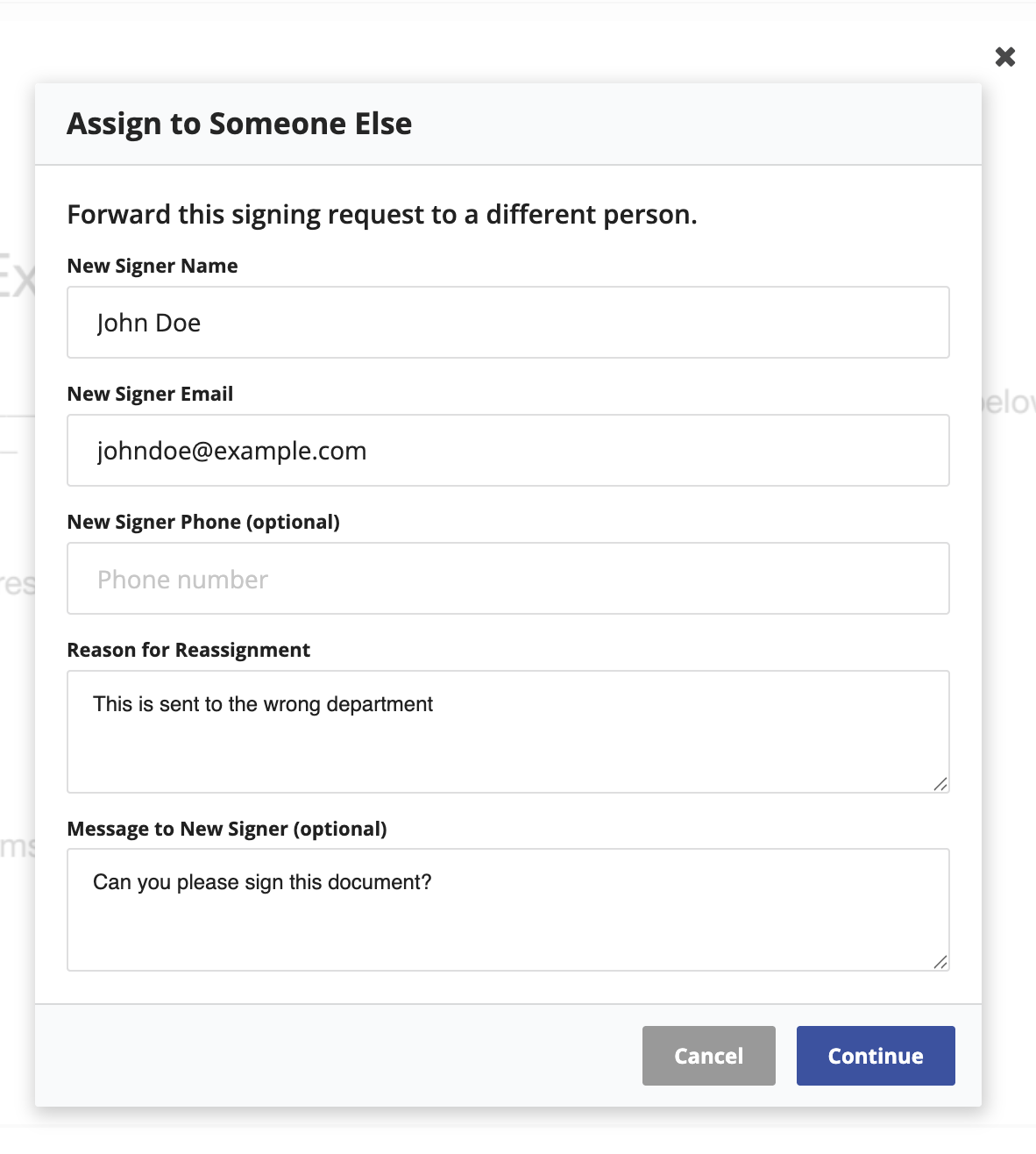
- The signer resolves it themselves. They name the new signer, state a reason, and optionally add a note. Blueink sends the new signing request immediately.
- The hand-off is on the record, not hidden. A reason is always required, and Blueink logs the reassignment on the Certificate of Evidence, naming the original signer, the new signer, and the reason.
- Everyone who needs to know is notified. The new signer gets their signing request, the original signer gets a confirmation, and the sender is notified by email and in the app.
- Senders stay in control. Reassignment can be turned off entirely, allowed once, or allowed to chain for the whole envelope or for one signer at a time.
- A request can't be handed back. Blueink rejects a hand-off to anyone earlier in the chain, or to anyone already signing the envelope, so a request can't bounce between two people.
How it works
- An administrator enables it for the account. Reassignment is off until an account administrator turns on Allow Signers to Reassign Signing Requests in your account settings.
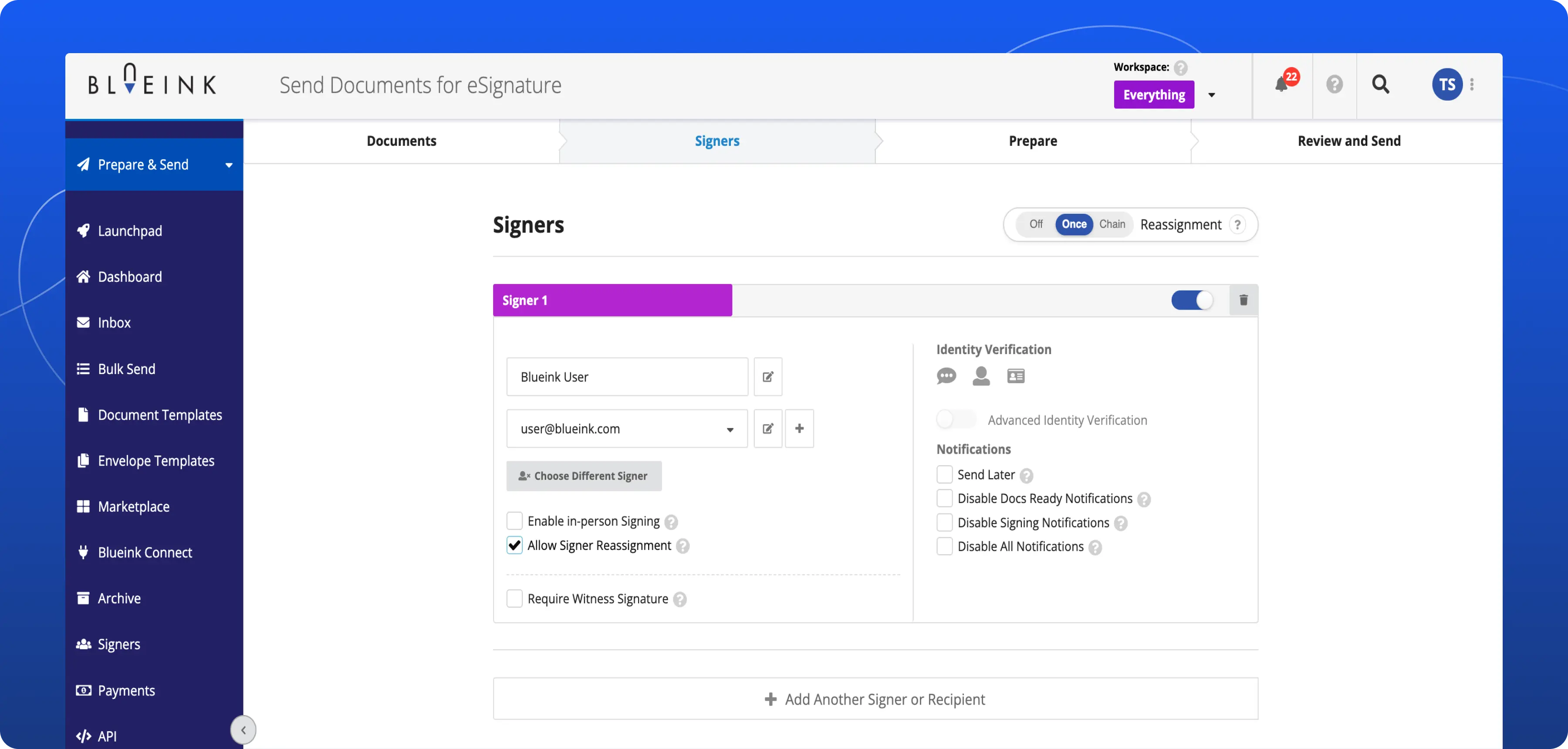
- The sender chooses the policy for the envelope. On the Signers step, a Reassignment control offers three settings: Off, Once, or Chain. Each signer can be opted out individually.
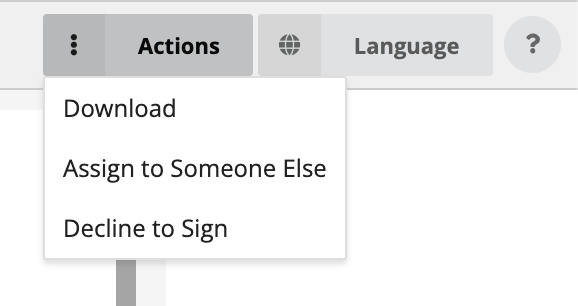
- The signer opens the reassignment form. Assign to Someone Else appears in the Actions menu of their signing session whenever reassignment is permitted for them.
- Blueink confirms before it acts. The signer reviews the new signer's details and the reason, and is warned that anything they entered but did not save will not carry over.
- The request moves on. The new signer receives a signing request that names who reassigned it. The original signer's request closes as Reassigned and needs nothing further from them.
For a step-by-step walkthrough, see How to Allow Signers to Reassign a Signing Request and How to Assign a Signing Request to Someone Else in the Blueink Help Center.
Good to know
- Reassignment is off by default. An account administrator enables it, and the sender then sets the policy before sending. After the envelope is sent, the sender cannot change the policy from Once to Chain or vice versa. If an individual signer’s status is still Sent, the sender can still enable or disable reassignment for that signer.
- The number of hand-offs in a single chain is capped at 3.
- Reassignment is not available on signers who require identity verification or authentication, on witnesses or signers who require one, on in-person and embedded signing sessions, or on signers in a Signer Group.
- Unsaved work does not transfer, and Blueink warns the signer about that before the hand-off.
- Senders who configured the wrong person should keep using the existing edit-signer action. Reassignment is for hand-offs the signer initiates.
Not using Blueink yet? Schedule a demo to explore how Signer Reassignment and the rest of the Blueink platform keep your signing workflows moving.