Build End-to-End eSignature Workflows in Your App
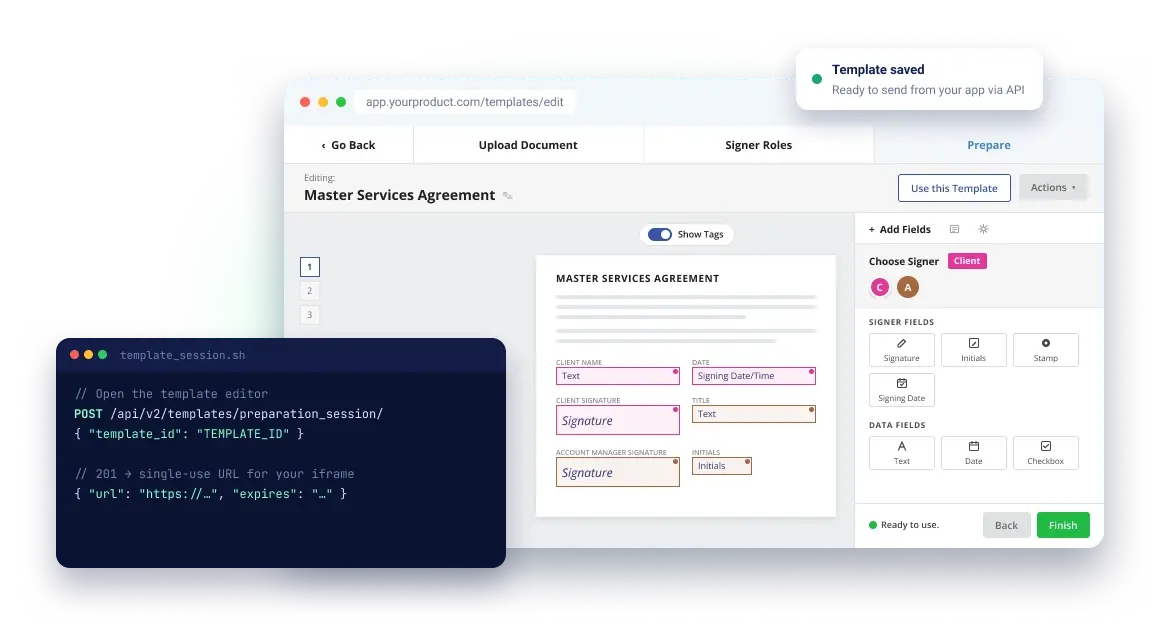
Let your users create reusable eSignature templates directly in your app. They can upload PDFs, define signer roles, add fields, and save templates to send documents again and again.

Embedded Template Editing with the Blueink
eSignature API

Let users turn the documents they send most into reusable eSignature templates. Create a template session with one API call, load it in an iframe, and keep template management inside your product.

Create reusable templates from any PDF

Users upload a PDF, set up signer roles, and place fields once. Then they save it as a reusable template for every future envelope.
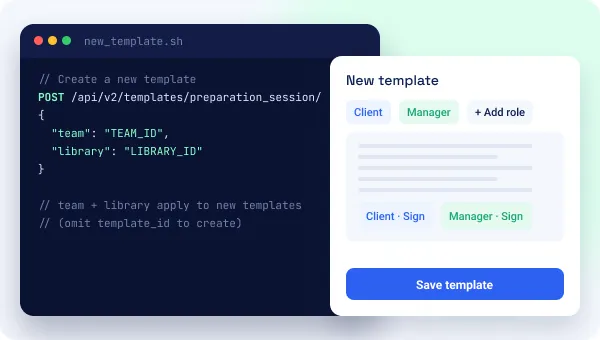
Blueink Embedded Template Editor API creating a reusable template from a PDF with signer roles
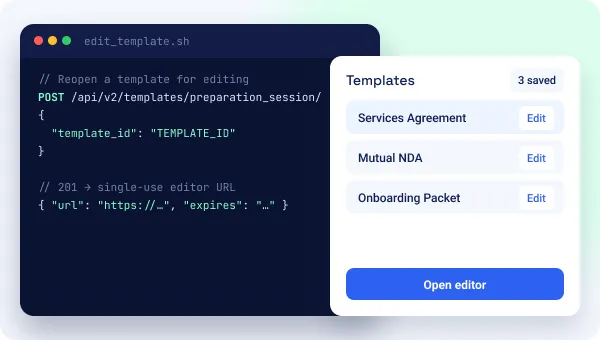
Blueink Embedded Template Editor API reopening an existing template by ID to update fields and roles

Edit existing templates anytime

Pass a template ID to reopen any template in the editor. Users update fields, roles, or documents and save their changes right away, with no support ticket required. New templates can be saved to a specific team and library.

Prefill and send from saved templates

When it's time to send, create an envelope from the saved template through the API. Assign each role to a signer and prefill known details, like names or contract values, with field values.
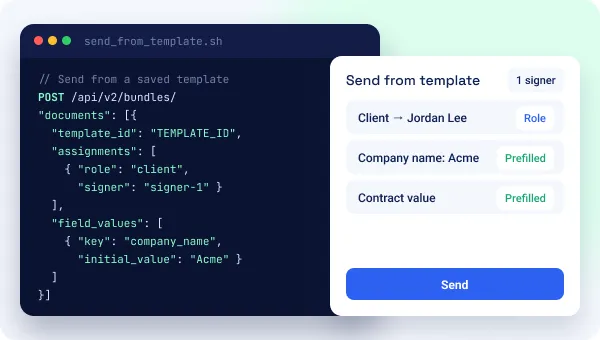
Blueink eSignature API creating an envelope from a saved template with roles assigned and fields prefilled

Benefits of Embedded Template Editing

Build End-to-End Workflows

Let users create, prepare, and reuse eSignature templates directly in your app.

Fewer support requests

Customers update their own templates instead of asking your team to change them.

Consistent documents

Every envelope sent from a template uses the same roles, fields, and layout.

No extra tools

Users create and edit templates in your app instead of a separate eSignature dashboard.

Start preparing templates in minutes

Create an embedded template editing session with one API call, then load the returned URL in your app.

terminal
# Edit a template (omit template_id to create a new one)
curl -X POST "https://api.blueink.com/api/v2/templates/preparation_session/" \
-H "Authorization: Token YOUR_API_KEY" \
-H "Content-Type: application/json" \
-d '{ "template_id": "YOUR_TEMPLATE_ID" }'
# 201 Created → load "url" in an iframe before "expires"
create_session.py
import os
import requests
resp = requests.post(
"https://api.blueink.com/api/v2/templates/preparation_session/",
headers={"Authorization": f"Token {os.environ['BLUEINK_PRIVATE_API_KEY']}"},
json={"template_id": "YOUR_TEMPLATE_ID"},
)
session = resp.json() # contains "url" and "expires"
createSession.js
const res = await fetch("https://api.blueink.com/api/v2/templates/preparation_session/", {
method: "POST",
headers: {
Authorization: `Token ${process.env.BLUEINK_PRIVATE_API_KEY}`,
"Content-Type": "application/json",
},
body: JSON.stringify({ template_id: "YOUR_TEMPLATE_ID" }),
});
const session = await res.json(); // { url, expires }
create_session.php
$ch = curl_init("https://api.blueink.com/api/v2/templates/preparation_session/");
curl_setopt_array($ch, [
CURLOPT_POST => true,
CURLOPT_RETURNTRANSFER => true,
CURLOPT_HTTPHEADER => [
"Authorization: Token " . getenv("BLUEINK_PRIVATE_API_KEY"),
"Content-Type: application/json",
],
CURLOPT_POSTFIELDS => json_encode(["template_id" => "YOUR_TEMPLATE_ID"]),
]);
$session = json_decode(curl_exec($ch), true); // url, expires
CreateSession.cs
using System.Net.Http.Json;
using System.Text.Json;
var apiKey = Environment.GetEnvironmentVariable("BLUEINK_PRIVATE_API_KEY");
using var http = new HttpClient();
http.DefaultRequestHeaders.Add("Authorization", $"Token {apiKey}");
var res = await http.PostAsJsonAsync(
"https://api.blueink.com/api/v2/templates/preparation_session/",
new { template_id = "YOUR_TEMPLATE_ID" });
var session = await res.Content.ReadFromJsonAsync<JsonElement>(); // url, expires

Smart Pricing for Every Business Size

Pay for what you actually need, with lower per-envelope rates as your usage expands.
Volume Discounts

API Envelopes

$0.95

Per Envelope

53% DISCOUNT

Total: $950

What’s Included

Volume Discounts

Save up to 75% with larger purchase

No Expiration

Use your credits whenever you need them

Free to Test

Unlimited testing during development

Up to 5 users

Multi-user access for your team

Developer dashboard

Comprehensive analytics and monitoring

Select Credit Amount: 1,000 credits

API Envelopes

Price per Envelope

Discount

Up to 1,000

$0.95

Scale pricing as you grow

5,000

$0.75

Save 21%

25,000

$0.60

Save 37%

100,000

$0.45

Save 53%

250,000

$0.35

Save 63%

500,000

$0.28

Save 71%

1,000,000

Best Value

$0.24

Save 75%

Up to 1,000
Scale pricing as you grow
$0.95
per envelope
5,000 Envelopes
Save 21%
$0.75
per envelope
25,000 Envelopes
Save 37%
$0.60
per envelope
100,000 Envelopes
Save 53%
$0.45
per envelope
250,000 Envelopes
Save 63%
$0.35
per envelope
500,000 Envelopes
Save 71%
$0.28
per envelope
1,000,000 Envelopes
Best Value
Save 75%
$0.24
per envelope

Bronze

Get started with the basics!

$108
PER MONTH
Build for Free
50 Envelopes per Month
1 User / Developer Account
5 Document Templates
Unlimited Test Envelopes
Email / Chat Support

Silver

Enhance your integration with additional features.

$288
PER MONTH
Build for Free
150 Envelopes per Month
Up to 5 User / Developer Accounts
15 Document Templates
Unlimited Test Envelopes
Email / Chat Support
Embedded Signings
SmartLink Forms

Gold

Upgrade to our top-tier plan for a premium solution.

$579
PER MONTH
Build for Free
500 Envelopes per Month
Up to 10 User / Developer Accounts
Unlimited Document Templates
Email / Chat Support
Embedded Signings
Smart Link Forms
User Metadata

Enterprise

Custom API packages to meet your needs

Let’s talk
ENTERPRISE OFFERINGS
Contact us
Includes All Gold Features
Custom Limits
World class support and onboarding

Bronze

Get started with the basics!

$90
PER MONTH

$1,080 billed annually

Build for Free
50 Envelopes
per Month
1 User / Developer Account
5 Document Templates
Unlimited Test Envelopes
Email / Chat Support

Silver

Enhance your integration with additional features.

$240
PER MONTH

$2,880 billed annually

Build for Free
150 Envelopes per Month
Up to 5 User / Developer Accounts
15 Document Templates
Unlimited Test Envelopes
Email / Chat Support
Embedded Signings
SmartLink Forms

Gold

Upgrade to our top-tier plan for a premium solution.

$480
PER MONTH

$5,760 billed annually

Build for Free
500 Envelopes per Month
Up to 10 User / Developer Accounts
Unlimited Document Templates
Email / Chat Support
Embedded Signings
Smart Link Forms
User Metadata

Enterprise

Custom API packages to meet your needs

Let’s talk
ENTERPRISE OFFERINGS
Contact us
Includes All Gold Features
Custom Limits
World class support and onboarding

Explore our range of Platform Plans & Pricing for more options here.

Manage and purchase credits once your account is created.

FAQs

What is an embedded template editor?

An embedded template editor lets your users create and edit reusable eSignature templates inside your app. They upload a PDF, define signer roles, place fields, and save, all in a secure session that Blueink hosts in an iframe.

How is template editing different from embedded envelope preparation?

Template editing creates a reusable template that you can send again and again. Embedded envelope preparation sets up a single envelope to send now, and users can start it from a saved template.

Can users edit templates they already created?

Yes. Your app can open an existing template in the editor so users can update it, or start a new one from scratch.

How do I send documents from a saved template?

Create an envelope through the Blueink API with the template's ID, and assign each template role to a signer. You can also prefill field values before sending.

Can I organize templates by team or library?

Yes. When a user creates a new template, your app can save it to a specific team and library.

What is a template API?

A template API lets your app manage templates in code. With the Blueink API you can list, view, update and delete templates, and webhooks tell your app when a template is created, updated or deleted.

How is embedded template editing priced?

The Blueink API is pay-as-you-go, so there are no plans to choose from. Embedded template editing just needs to be turned on for your account. Contact Blueink to enable it.

Do my users need a Blueink account?

No. Your company needs a Blueink account to connect through the API, but your users create and edit templates inside your app without their own Blueink login.

“We were tired of DocuSign’s inconsistencies, the escalating costs, an account rep that changed every ninety days, and the lackluster customer service. The moment we switched to BlueInk, we experienced immediate benefits – a 45% cost savings, a dedicated support dream-team responding in minutes, and a more efficient business with 58% productivity improvement, 70% faster document turnaround, all in just 3 days."
Bryan Jenkins Principal Broker, AHI Properties
"BlueInk’s reasonable cost and multiple document-sharing options is the fastest and simplest way to get parent signatures, and the cost is unbeatable. Our favorite feature is the text message option, allowing us to effortlessly obtain consent for various forms. We were impressed not just by the functionality but also by the affordability. It's a fraction of the cost compared to other solutions. With BlueInk, we save time, money, and paper.”
Shauni Vaughn Director of Student Services
"Serving workers' comp statewide, signatures were a pain. We tried DocuSign and HelloSign, but they weren't efficient. BlueInk's SMS feature changed it all. Patients sign instantly, mistakes are rare. Our document processing time went from a frustrating 10 days down to less than an hour. Plus, it's a budget-friendly choice, and that's been a real game-changer for our pharmacy!”
Tan Pham, Pharmacist, Tytus Group, Brightside Specialty Pharmacy