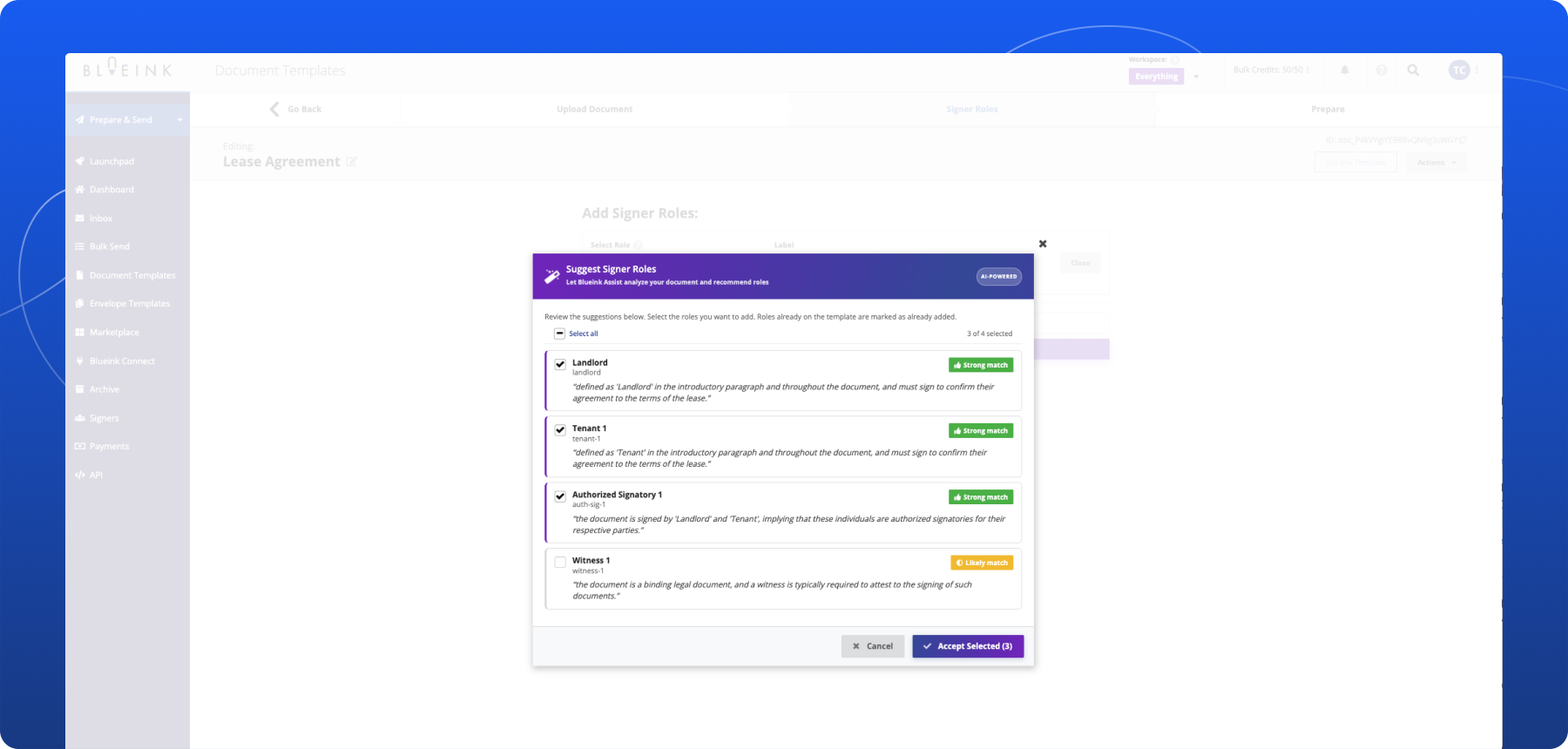

AI-Powered Signer Role Suggestions for Faster Document Setup

Blueink has introduced AI Suggested Signer Roles, a new Blueink feature designed to simplify document and envelope setup by intelligently suggesting signer roles based on document content.
Instead of manually reviewing a document and creating signer roles from scratch, users can now upload a document and receive AI-powered signer role suggestions directly within the setup workflow.
This helps teams reduce repetitive setup work, speed up document preparation, and create envelopes and templates more efficiently.
The Problem
Setting up signer roles is a repetitive part of preparing documents for eSignature.
Teams often need to review documents manually, determine who needs to sign, create signer roles, and label each participant before sending. For organizations handling large volumes of recurring agreements, onboarding forms, or operational documents, this process can become time-consuming.
The challenge becomes even larger when working with unfamiliar documents where signer responsibilities may not be immediately obvious.
This can lead to:
- slower document preparation
- repetitive manual setup
- inconsistent role naming
- additional review time before sending
The Update
Blueink can now analyze document text and suggest signer roles during document and envelope setup. When uploading a document into a new Envelope or Template, Blueink analyzes the content and proposes signer roles that may apply to the workflow.
Users can:
- accept suggested roles
- edit role names
- remove unnecessary roles
- add additional signer roles manually
The feature also includes confidence labels to help users quickly identify stronger matches while reviewing suggestions that may require additional confirmation. Together, these improvements help reduce repetitive setup work while giving users more guidance during document preparation.
How It Works
AI Suggest Signer Roles is available during both Envelope Template Setup and Document Template setup. Before users can access the feature, an account administrator must first turn it on from the account’s Features Opt-In screen. Once enabled, users can upload a document and review AI-powered signer role suggestions during setup.
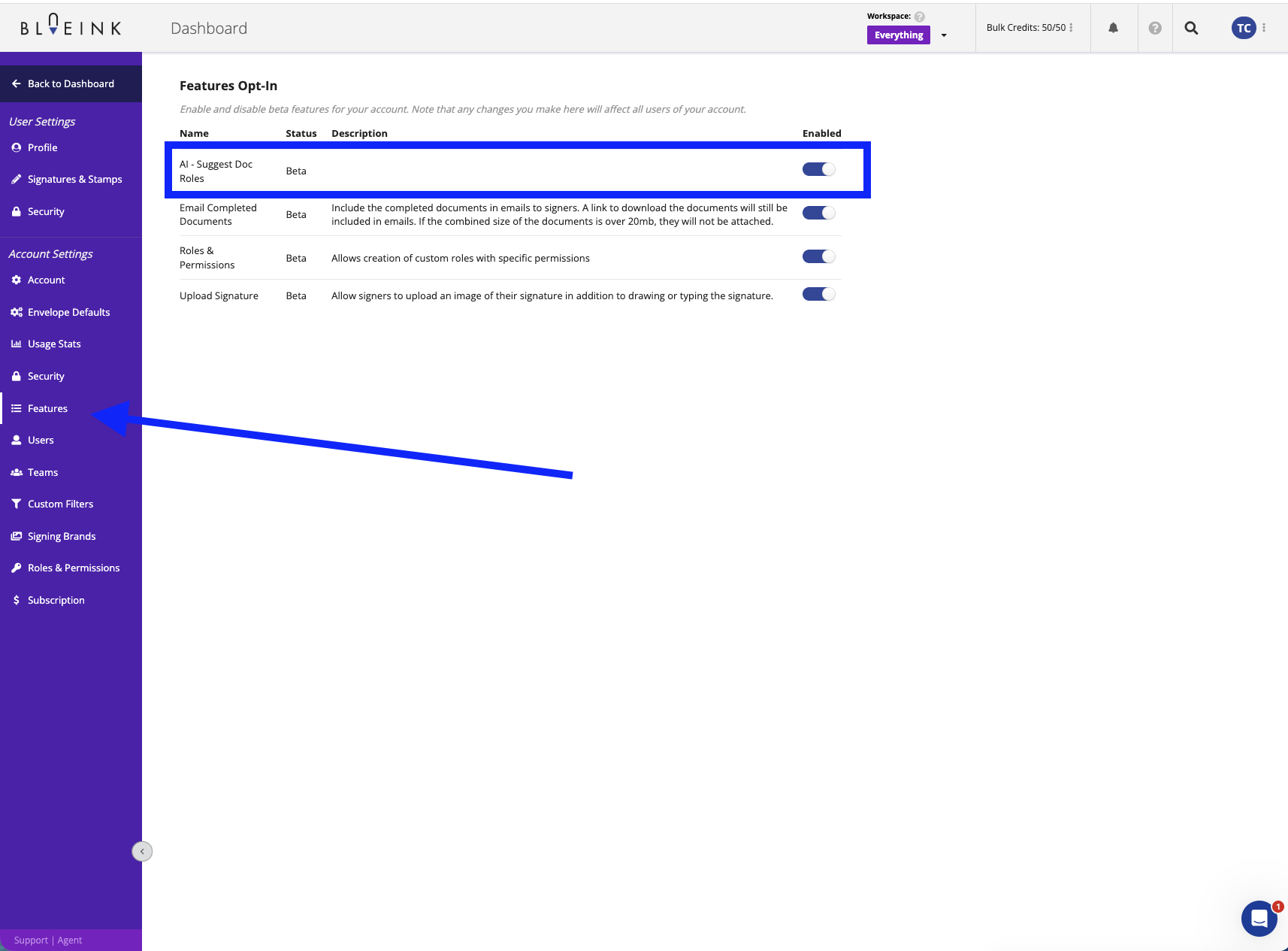
Upload a Document
Upload a document into a new Envelope or Template workflow.
Review Suggested Signer Roles
Blueink analyzes the document text and proposes signer roles based on the content identified within the document.
Check Confidence Labels
Each suggested role includes a confidence indicator to help users evaluate which suggestions are likely strong matches and which may require additional review.
Customize the Roles
Users can accept suggestions as-is, rename roles, remove roles, or add additional signer roles before continuing with setup.
Continue the Workflow
Once confirmed, the signer roles are added directly into the document or template workflow for continued preparation and sending.
Good to Know
AI Suggest Signer Roles is designed to assist with document setup, but users are still responsible for reviewing and confirming signer roles before sending documents.
Suggestion quality depends on how clearly signer roles appear within the uploaded document. Documents with clear structure and role references generally produce stronger suggestions than heavily scanned or handwritten documents.
This feature helps organizations reduce repetitive setup work while making document preparation faster and easier for recurring workflows and unfamiliar documents alike.
Not using Blueink yet? Schedule a demo to explore how Blueink can simplify document preparation and eSignature workflows.