

Top eSignature Platforms for Real Estate in 2026

Real estate moves fast, but the paperwork often does not. According to the National Association of REALTORS® 2025 Profile of Home Buyers and Sellers, approximately nine in 10 buyers and sellers worked with a real estate agent. With experienced buyers and sellers dominating the market, clients expect transactions to move quickly and professionally, and that starts with how documents are sent and signed.
When an offer, counteroffer, listing agreement, disclosure, or addendum is ready to sign, the eSignature platform has to make the next step simple. A buyer may need to sign from a phone after work. A seller may be traveling. A transaction coordinator may need to send several documents before a deadline. A small brokerage may need professional signing workflows without paying for enterprise software it does not fully use.
This guide compares three eSignature platforms real estate professionals may consider in 2026: Blueink, Dropbox Sign, and SignNow. We will look at what matters most for independent agents and small brokerages: speed, ease of use, mobile signing, pricing, templates, audit trails, and overall value.
What Real Estate Agents Need From eSignature Software
Real estate document signing is different from many other business workflows. A delayed signature can affect offer timelines, inspection windows, financing contingencies, disclosures, amendments, and closing coordination.
The best eSignature for real estate should help agents move quickly without making clients feel like they need technical support just to sign a document.
The most important features are not always the ones with the flashiest names. For real estate teams, the real value usually comes down to how quickly documents can be prepared, how easily clients can sign, and how clearly the team can track completion.
Fast Document Sending
Agents need to prepare and send documents quickly. If it takes too long to place fields, assign signers, or reuse a common document, the platform slows the transaction down.
Reusable templates are especially useful for listing agreements, buyer agreements, disclosures, addenda, and recurring internal brokerage forms. A good template system helps agents avoid rebuilding the same document over and over.
This matters because real estate documents are often time-sensitive. If a buyer wants to submit an offer the same evening or a seller needs to approve a counteroffer quickly, the platform should help the agent move from document preparation to signature without extra steps.
Simple Mobile Signing for Real Estate Agents
Clients are not always at a desk. They may be signing from a phone during lunch, while traveling, or between showings. If the signing experience requires too much pinching, zooming, downloading, or account creation, clients may delay the task.
Mobile-friendly signing is now a practical requirement for real estate eSignature software. More than 60 percent of emails are opened on mobile devices, which means the odds are high that a client will first see a signing request on their phone. The easier it is for buyers, sellers, landlords, tenants, or authorized representatives to sign from a mobile device, the less time agents spend walking clients through the process.
For independent agents, this is especially important. Every extra signer question takes time away from showings, follow-ups, negotiations, and client service.
Clear Pricing for Small Teams
Independent agents and small brokerages need pricing that is easy to understand. The issue is not always the lowest monthly price. It is whether the plan includes enough envelopes, templates, users, reminders, authentication options, and support for the way the team actually works.
A plan that looks affordable at first can become less practical if key features sit behind higher tiers.
For example, an agent who only sends a few documents per month may be comfortable with a lower-volume plan. A busier agent or small brokerage may need more envelopes, more templates, SMS Delivery, team tools, or stronger authentication. The best value comes from matching the plan to the actual workflow.
Audit Trails and Legal Support
Real estate documents need clear signing records. At minimum, agents should look for audit trails, timestamps, signer activity records, and eSignature workflows designed to support laws such as the U.S. ESIGN Act and UETA.
The ESIGN Act generally supports the legal validity of electronic signatures and records in the United States, while UETA provides a similar legal framework at the state level where adopted.
That said, real estate requirements can vary by state, document type, brokerage policy, and transaction context. Agents should confirm requirements for documents that may need witnessing, notarization, specific disclosures, association-approved forms, or additional legal review.
Quick Comparison: Blueink vs Dropbox Sign vs SignNow
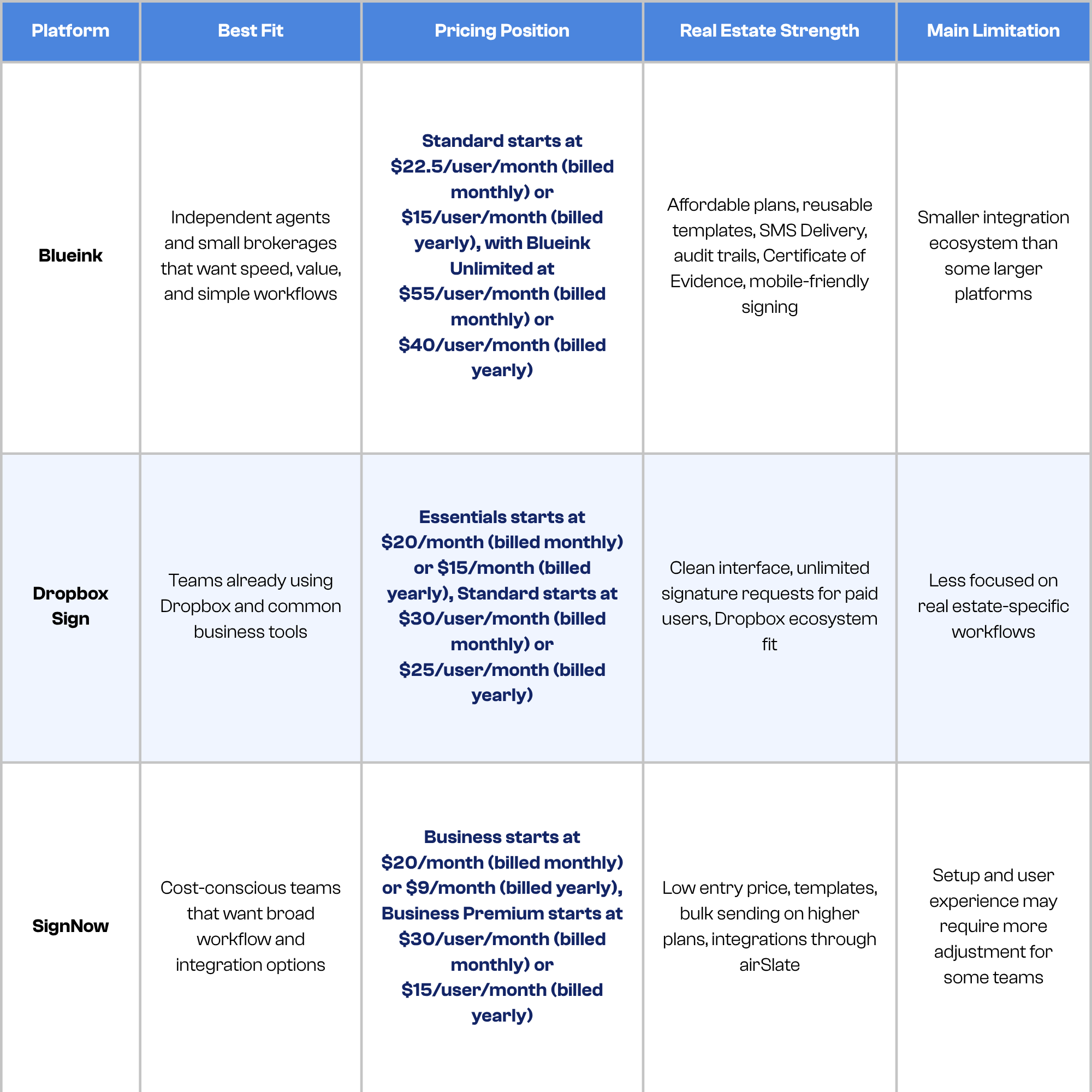
Pricing can change, so teams should always confirm current details on the official Blueink pricing page, Dropbox Sign pricing page, and SignNow pricing page before choosing a plan.
Blueink: Best for Independent Agents and Small Brokerages That Want Speed and Value
For independent agents and small brokerages, the best eSignature for real estate is not the one with the longest feature list. It is the one that helps documents move from prepared to signed as fast as possible, without making clients jump through hoops. Blueink is built around that priority.
Pricing That Makes Sense for Real Estate Volume
According to the official Blueink pricing page, the Standard plan starts at $15 per user per month when billed annually and includes 120 envelopes per user per year. Business Pro starts at $30 per user per month when billed annually and includes 1,800 envelopes per user per year. Blueink Unlimited is $40 per user per month when billed annually and includes unlimited envelopes and unlimited templates.
To put that in perspective: a solo agent closing 40 transactions per year may send 5 to 10 signature requests per deal, which adds up to 200 to 400 envelopes annually. The Business Pro plan at $30 per month covers that volume with room to spare. A boutique brokerage with two or three active agents may find Blueink Unlimited a better fit since the per-user cost stays predictable regardless of how busy the pipeline gets.
Compare that to Dropbox Sign, where the Standard plan at $25 per user per month offers unlimited requests but pushes team features into higher tiers. SignNow starts lower at $9 per month on the entry plan, but that tier has limitations that may require upgrading as volume or workflow complexity increases. Blueink's plans are structured to match how real estate professionals actually work, not how enterprise software teams do.
Features Built for Real Estate Workflows
Blueink includes several features that fit real estate document signing directly.
Reusable templates let agents build listing agreements, buyer agreements, disclosures, addenda, and brokerage forms once and reuse them across transactions. Instead of rebuilding the same document every time, an agent can open a template, assign signers, and send in minutes. For high-volume agents handling multiple active clients, that time savings adds up quickly across a full year of transactions.
SMS Delivery is one of Blueink's more practical differentiators for real estate. Not every client checks email promptly. A buyer who is at work, traveling, or managing a busy schedule may miss an email notification for hours. SMS Delivery sends the signing request directly to the client's phone as a text message, which dramatically reduces the time between send and signature. In a competitive offer situation or a tight inspection window, that difference can matter.
Authentication options give agents and brokerages additional control over who signs. For standard transactions, basic email authentication is sufficient. For documents requiring higher confidence in signer identity, Blueink supports additional verification methods. This is useful for brokerages that handle high-value transactions, investor deals, or situations where signer verification is a priority.
Blueink's Certificate of Evidence is a tamper-evident record of the entire signing event, capturing timestamps, IP addresses, and signer activity. It gives agents documented proof of exactly who signed, when, and from where, which can be important if a document's validity is ever questioned.
A Signing Experience Clients Can Actually Use
The sender experience is only half the picture. Clients who are confused by the signing interface will delay the process or call the agent for help. Blueink keeps the signer experience clean and straightforward. Clients do not need to create an account, download an app, or navigate a cluttered interface. They open the link, follow clear prompts, and sign.
That simplicity matters most on mobile. A buyer signing from their phone after dinner should not need to pinch, zoom, or scroll past irrelevant fields to complete a two-minute task. Blueink's mobile signing experience is designed to minimize friction, which means fewer abandoned documents and fewer support calls for the agent.
For independent agents managing their own transactions without admin support, this is especially valuable. Every minute spent troubleshooting a client's signing experience is a minute not spent on showings, negotiations, or new leads.
Where Blueink Fits Best
Blueink is not necessarily the right fit for every large enterprise brokerage with complex CRM integrations and dedicated IT support. Teams that rely heavily on a specific transaction management platform or need deep custom automation may want to verify available integrations before committing.
But for independent agents, boutique brokerages, and small real estate teams that want a platform combining predictable pricing, fast document preparation, reliable mobile signing, and clear audit records, Blueink covers everything that matters for everyday real estate document signing without unnecessary complexity.
Dropbox Sign: Best for Teams Already Using Dropbox
Dropbox Sign, formerly HelloSign, is a well-known eSignature platform backed by the broader Dropbox ecosystem. For agents or brokerages already using Dropbox to store files, share documents, or manage business content, Dropbox Sign may feel familiar.
The platform is easy to understand and offers a clean signing experience. Dropbox Sign also promotes unlimited signature requests on its paid plans, which can be useful for agents who want to avoid worrying about overages or sending too many signature requests.
According to the official Dropbox Sign pricing page, Essentials is listed at $20 per month (billed monthly) or $15 per month (billed yearly) for an individual user. Standard, designed for small teams, is listed at $30 per user per month (billed monthly) or $25 per user per month (billed yearly).
Dropbox also offers a Dropbox with Sign Essentials plan that lets customers securely share, sign, and store documents in one workflow. For teams already storing contracts, disclosures, and client files in Dropbox, the native integration removes an extra step. Documents can move from storage to signature request without switching platforms, which is a genuine workflow advantage for Dropbox-first teams.
The biggest advantage of Dropbox Sign is its ecosystem. It connects with tools many teams already use and may make sense for brokerages that store documents in Dropbox or rely on Dropbox-based workflows.
The tradeoff is that Dropbox Sign is a broad eSignature tool, not a real estate-first platform. It can handle real estate documents, but agents may need to create and customize their own templates and workflows. For some teams, that is fine. For agents who want the fastest path from prepared document to signed agreement, Blueink may feel more direct and cost-effective.
SignNow: Best for Teams That Prioritize Low Entry Pricing and Workflow Options
SignNow is another strong option, especially for cost-conscious teams that want a lower entry price and access to broader workflow tools.
According to the official SignNow pricing page, the Business plan starts at $20 per month (billed monthly) or $9 per month (billed yearly), while Business Premium starts at $30 per user per month (billed monthly) or $15 per user per month (billed yearly). That low entry price makes SignNow appealing for agents or small teams watching every software expense.
The platform supports common eSignature needs such as document sending, templates, signing workflows, reminders, and audit trails. SignNow also promotes features such as reusable templates, role-based fields, authentication controls, automated reminders, and audit trails, which can be useful for teams that want structured document workflows.
SignNow's connection to the broader airSlate ecosystem is a real advantage for operations-focused brokerages that want to build automated document workflows, routing forms, triggering follow-ups, and connecting to CRM tools without manual steps. For a brokerage with a dedicated transaction coordinator or admin, that depth can be genuinely valuable.
However, the lower starting price does not automatically make it the best value for every agent. Ease of use matters. If a solo agent has to spend more time setting up workflows, troubleshooting signer questions, or adjusting templates, the time cost can offset some of the subscription savings.
For small brokerages that have a transaction coordinator or admin managing documents, SignNow may work well. For independent agents who want a simple, fast platform that feels easy from day one, Blueink may be the better fit.
Which Platform Is Fastest for Real Estate Workflows?
Speed in real estate eSignature software is not just about how quickly a platform loads. It is about how fast an agent can move from document preparation to completed signature.
Blueink stands out here because it keeps the workflow focused. Agents can create reusable templates, send documents, use SMS Delivery for time-sensitive signing, track document status, and maintain audit records without needing an overly complex setup.
Dropbox Sign is also easy to use, especially for teams familiar with Dropbox. However, it is more of a general-purpose eSignature platform, so real estate teams may spend more time adapting it to their workflows.
SignNow can support fast signing once workflows are set up, but some teams may need more onboarding time to configure templates, roles, and automations.
For independent agents and small brokerages, Blueink has the clearest advantage because speed comes from simplicity. The fewer steps it takes to send and sign, the less likely a deal is to stall.
Which Platform Offers the Best Value for Real Estate Document Signing?
Value depends on the agent’s volume and workflow needs.
Blueink offers a strong balance of affordability and real estate-ready functionality. For agents who send a high number of documents, unlimited envelopes can make costs easier to predict.
Dropbox Sign offers unlimited signature requests on paid plans, which is helpful. However, team features and advanced needs may push users into higher tiers depending on the brokerage’s workflow.
SignNow has the lowest entry price in this comparison. That can be attractive for budget-conscious users, but value is not only monthly cost. Agents should also consider ease of use, setup time, client experience, support, and whether the platform fits real estate workflows without extra work.
All three platforms offer free trials, which makes it possible to test the workflow before committing. Blueink's trial gives agents access to core sending and signing features so they can evaluate the experience firsthand.
For most independent agents and small brokerages, Blueink offers the best balance: affordable pricing, simple sending, mobile-friendly signing, and enough workflow control for everyday real estate documents.
Compliance Considerations for Real Estate eSignature
Electronic signatures are widely used in real estate, but agents should still be careful with compliance. The platform should support audit trails, signer records, timestamps, and document activity logs.
The ESIGN Act and UETA provide the legal foundation for many electronic signature workflows in the United States, but certain real estate documents may still have state-specific requirements. Some forms may require notarization, witnessing, special disclosures, brokerage approval, or association-approved formatting.
The safest approach is to use eSignature software that supports strong records, then confirm document-specific requirements with your broker, legal counsel, state association, or local real estate rules.
Blueink supports legally binding eSignatures, audit trails, and a Certificate of Evidence, which can help agents and brokerages maintain clearer records of signing activity. That does not replace legal review for special documents, but it gives teams a stronger operational foundation for everyday signing workflows.
The Bottom Line: The Best eSignature for Real Estate Should Help Deals Move Forward
The best eSignature for real estate is not always the platform with the biggest brand name or the longest feature list. For working agents, the best platform is the one that helps documents move faster, keeps clients from getting confused, and makes pricing easy to understand.
Dropbox Sign is a capable option for teams already using Dropbox. SignNow is a solid choice for budget-conscious teams with admin support that want broad workflow options. Both platforms can handle real estate document signing effectively for the right team.
But for independent agents and small brokerages that need speed, simplicity, mobile-friendly signing, and strong value, Blueink is the strongest option in this comparison.
Blueink gives agents the tools they need to send documents quickly, collect signatures from clients on the go, reuse common templates, track signing status, and maintain clear records without unnecessary complexity.
In real estate, every delay has a cost. When the right signature is the only thing standing between an agreement and the next step, your eSignature platform should help you move forward, not slow you down.
Start a free trial with Blueink to see how fast and simple real estate document signing can be.
Disclaimer
Blueink is not a law firm and does not provide legal advice. This page is for informational purposes only and should not be considered a substitute for professional legal counsel. If you have questions about the validity or enforceability of eSignatures or digital signatures, we recommend consulting with a licensed attorney. Use of Blueink’s services is subject to our Terms of Use and Privacy Policy.