
Custom Branding in eSignatures: Building Client Trust Through Personalization

In today’s digital-first business landscape, client trust often begins long before a signature is added to a document. From the first email a client receives to the final confirmation page they see after signing, every interaction shapes their perception of your brand.
That’s why custom branding in eSignatures is more than just a design feature. It’s a reflection of professionalism and reliability. With Blueink’s eSignature platform, businesses can customize their signing experience by adding their own logo, personalizing emails, and redirecting signers to their own webpage once the signing process is complete.
These seemingly small details play a powerful role in building confidence and loyalty among clients. In this article, we’ll explore why custom branding matters, how it impacts client trust, and how businesses can leverage it effectively.
1. What Is Custom Branding in eSignatures?
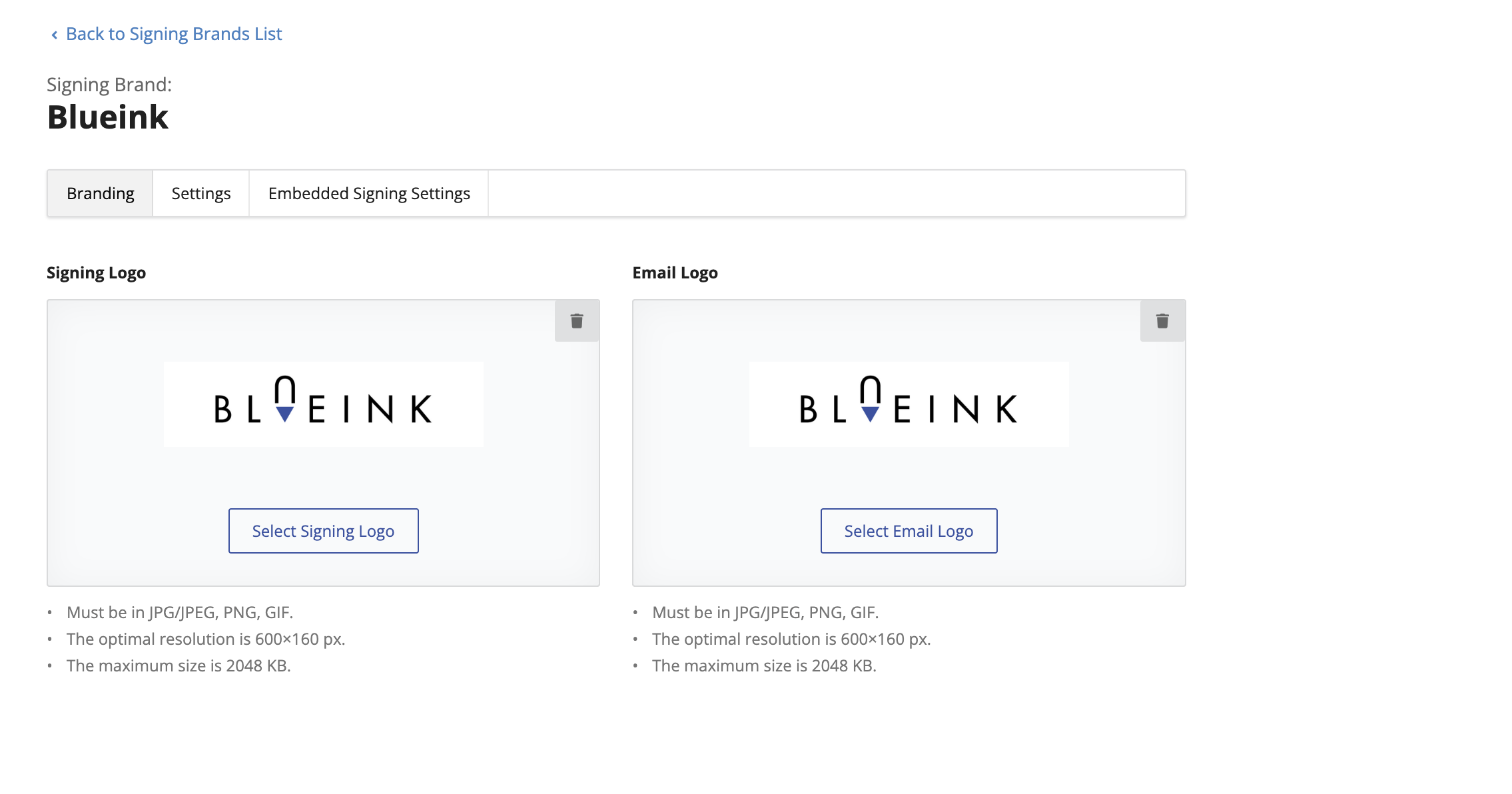
Custom branding in eSignatures allows organizations to incorporate their brand identity throughout the document signing process. This typically includes visual elements such as:
- Company logo displayed during the signing experience
- Custom email templates used for notifications or reminders
- Redirects that guide signers to a company’s webpage after completing the signing process
These elements reinforce your brand’s identity, helping recipients recognize that the document truly comes from your organization. When clients see familiar branding, they feel reassured that the document is legitimate and secure.
2. Why Custom Branding Matters
When clients sign documents online, they want to be certain they are interacting with the right company. A generic, unbranded signing experience can sometimes cause hesitation, especially when sensitive or financial information is involved.
Custom branding helps close that trust gap. It communicates credibility and professionalism while reducing confusion or doubts about the document’s origin.
Let’s look at why it matters from both a psychological and business perspective.
a. Reinforces Professional Identity
Every branded interaction contributes to a unified brand identity. Whether you are a small business or a large enterprise, consistent visuals build recognition. A professional appearance also signals that your company takes security and presentation seriously.
b. Enhances Client Confidence
Clients are more likely to engage when they recognize your brand throughout the process. A branded logo on the signing page reassures them that they’re in the right place and that the document is genuine.
c. Reduces Fraud Risk
Phishing scams and fake signature requests are increasingly common. Branded emails and consistent redirect links act as a safeguard by allowing recipients to easily verify the authenticity of requests.
d. Strengthens Brand Recall
After a signing session, Blueink allows businesses to redirect signers to their own webpage. This simple step not only maintains engagement but also reinforces brand recall, leading to higher customer retention and follow-up opportunities.
3. The Role of Trust in Digital Transactions
Trust is the foundation of every transaction, whether digital or physical. In eSignature workflows, this trust is built through clear communication, transparency, and a secure signing environment.
When signers see your brand logo and custom message, it reassures them that they are dealing directly with you. This subtle yet meaningful reassurance helps strengthen relationships with both new and existing clients.
Without branding, the signing process can feel impersonal or disconnected. A client might think, “Is this email really from the company I’m working with?” Branding eliminates that uncertainty and fosters confidence.
4. How Blueink Enables Custom Branding
Blueink understands that personalization is key to client experience. That’s why it provides businesses with built-in custom branding features that are simple yet impactful.
Here’s what you can customize with Blueink:
a. Add Your Company Logo
Display your logo on emails and signing pages so recipients immediately recognize your brand. This creates a seamless connection between your organization and the digital signing process.
b. Customize Email Templates
Emails are often the first touchpoint for signers. With Blueink, you can tailor the notification emails sent to signers, adding your company’s visual identity and messaging for a more polished and trustworthy experience.
c. Redirect Signers to Your Own Page
After completing a document, signers can be automatically redirected to your website or a thank-you page. This helps you keep engagement within your ecosystem, whether it’s a client portal, feedback page, or marketing site.
5. The Psychological Impact of Branding
Human psychology plays a major role in how trust is formed online. Let’s examine how branding influences client perception during eSignature interactions.
a. Familiarity Builds Comfort
People tend to trust what feels familiar. When clients recognize your logo and design elements, their comfort level rises. Familiar visuals trigger reassurance and reduce the cognitive effort of deciding whether something is safe.
b. Visual Consistency Equals Reliability
Inconsistent branding can signal disorganization. A consistent brand experience across every email and signing screen tells clients that your business is structured and dependable.
c. Aesthetic Quality Reflects Professionalism
Design quality directly influences how clients perceive your credibility. Clean, branded signing pages convey attention to detail, suggesting that your company values both security and presentation.
6. Real-World Applications of Custom Branding
Let’s consider a few examples of how different industries benefit from custom branding in their eSignature workflows.
a. Real Estate
Real estate professionals send contracts and disclosure forms that require high levels of trust. Adding branding assures clients that they are signing legitimate property documents and not phishing attempts.
b. Financial Services
Banks, lenders, and fintech companies handle sensitive data. Branded emails and signing experiences strengthen client confidence, ensuring they know their financial agreements are secure.
c. Education and Government
Educational institutions and government offices can maintain official identity by using their logos on signing pages. Redirecting signers to official portals also improves transparency and public confidence.
d. Healthcare
Medical organizations can reassure patients that consent forms and agreements come from the actual healthcare provider. Branding helps maintain patient privacy and regulatory compliance.
7. Best Practices for Implementing Custom Branding
To maximize the impact of your branding efforts, it’s important to plan and implement them carefully. Here are key best practices:
a. Keep It Simple
Avoid cluttered visuals or too many colors. A minimal, professional logo and clean layout work best across devices.
b. Include a Personalized Message
Add a short thank-you or confirmation message in your email or post-signing page. Simple touches like “Thank you for signing with [Company Name]” make the experience more personal.
d. Test the Signing Experience
Before sending documents to clients, preview how your custom branding appears on both desktop and mobile devices. Testing ensures a consistent and professional experience across all signers.
e. Monitor Engagement
Use analytics or feedback tools to track how recipients interact with your branded emails and redirect pages. This helps refine your approach over time.
8. How Custom Branding Improves Client Retention
When clients trust your digital processes, they are more likely to stay loyal. Branding builds emotional connection. It tells clients, “We care about your experience.”
Here’s how it helps with retention:
- Reinforces trust in digital interactions
- Creates a consistent experience across multiple transactions
- Encourages repeat business through professional presentation
- Differentiates your company from unbranded alternatives
Small details, like seeing your logo or landing on your website after signing, remind clients why they chose to work with you.
9. Measuring the Impact of Custom Branding
To ensure your branding efforts deliver real results, track metrics that reflect trust and engagement:
- Email open and click rates (to see if branded emails perform better)
- Completion rates of signing sessions (higher trust often means fewer drop-offs)
- Client feedback or survey scores
- Website engagement after redirects
These insights can help you fine-tune your messaging and visual presentation to further strengthen trust.
10. Common Mistakes to Avoid
While implementing custom branding is straightforward, there are pitfalls to watch out for:
- Overloading the design with unnecessary visuals
- Using outdated logos or inconsistent colors
- Redirecting signers to non-secure or unrelated pages
- Forgetting to test email rendering across devices
Remember: simplicity and consistency are the keys to creating a trustworthy digital signing experience.
11. The Future of Branded eSignatures
As digital transformation accelerates, personalization will become an even greater differentiator. Clients will expect experiences that feel tailored and secure, not generic or disconnected.
Custom branding will continue to evolve beyond just logos and custom emails. Businesses may soon integrate personalized video thank-yous, interactive confirmation pages, or integrated onboarding steps after signing, all within their brand ecosystem.
For now, features like custom email branding, company logos, and redirects provide a solid foundation for a trustworthy and engaging experience. And with platforms like Blueink, implementing these capabilities doesn’t require complex setup. It’s designed to be intuitive for any business.
Building Trust with Branded eSignatures
Custom branding in eSignatures is about more than aesthetics. It’s about trust, identity, and professionalism. Every logo, email, and redirect page reinforces your company’s commitment to authenticity and client care.
Blueink makes it easy for businesses to create a branded signing experience that feels personal and credible. By incorporating your logo, customizing your signing emails, and redirecting clients to your website after signing, you create a seamless digital interaction that inspires confidence and long-term loyalty.
In a world where first impressions often happen online, branded eSignatures are your silent ambassadors, building trust, one signature at a time. Ready to strengthen your organization’s credibility? See how Blueink can enhance your document workflows by scheduling a demo with us today.
Frequently Asked Questions (FAQs)
1. What is custom branding in eSignatures?
Custom branding allows businesses to personalize their eSignature experience by adding company logos, customizing emails, and redirecting signers to their own webpage after signing.
2. Why does branding matter in digital signing?
Branding builds client trust by confirming the authenticity of documents, reducing confusion, and reinforcing your company’s professionalism.
3. Can I customize the signing page with Blueink?
Yes. You can display your logo and use your own branded email templates. Once the signing process is complete, signers can be redirected to your chosen webpage.
4. Does custom branding affect security or compliance?
No. Custom branding in Blueink works alongside all security and compliance features, ensuring every transaction remains legally binding and encrypted.
5. What happens after the signer completes the document?
After signing, users can be redirected to your preferred page, such as your homepage, a thank-you page, or a portal login page.
6. Can small businesses benefit from branding too?
Absolutely. Even small companies benefit from branded emails and logos, as they enhance credibility and make clients feel more confident during the signing process.
7. How do I enable custom branding in Blueink?
You can set up branding through your Blueink account settings, where you’ll find options for adding your logo, editing emails, and managing post-signing redirects.
Disclaimer
Blueink is not a law firm and does not provide legal advice. This page is for informational purposes only and should not be considered a substitute for professional legal counsel. If you have questions about the validity or enforceability of eSignatures or digital signatures, we recommend consulting with a licensed attorney. Use of Blueink’s services is subject to our Terms of Use and Privacy Policy.

Recent post
October 12, 2026
October 6, 2026
October 1, 2026
September 22, 2026
September 15, 2026